

About this Post
In this article you will learn how to implement an asynchronous web server (Async WebServer) using ESP32 boards. The first steps are straightforward, but as soon as you want to use the server to control or query states, new challenges arise. Things get particularly interesting when several ESP32s need to communicate with each other and the user interface needs to be attractive at the same time.
This is what you can expect:
- Async WebServer vs. classic WebServer
- Preparations
- Introduction: “Hello World”
- Switching one LED via browser
- Three LEDs + PWM + analogRead
- Controlling multiple ESP32s
Async WebServer vs. classic WebServer
Perhaps some of you have read my article WLAN with ESP8266 and ESP32. There I used a simple, classic web server to control ESP8266 and ESP32 boards. So why another post about the Async WebServer?
A significant difference between the two web server variants is that the classic web server works in a blocking manner, unlike the Async WebServer. This is illustrated in the following diagram:
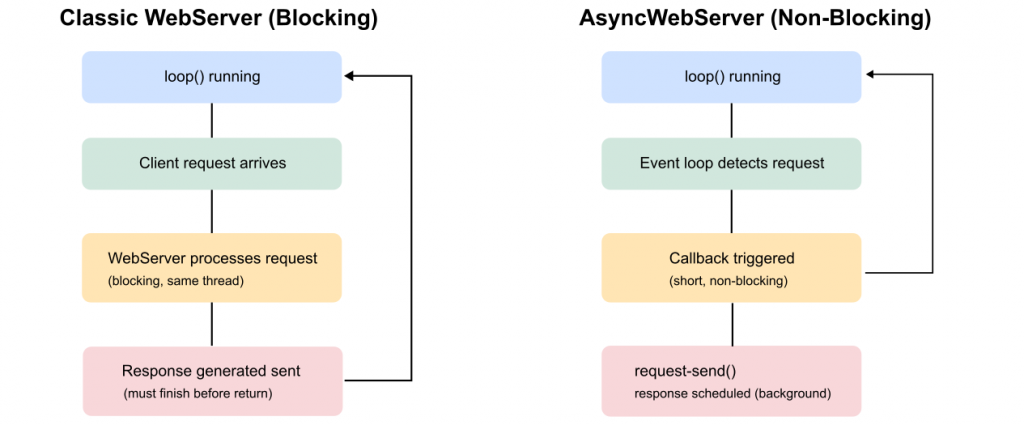
With the classic web server, the server is handled in loop() and is continuously queried with server.handleClient(). In the case of a client request (e.g., the PC browser accesses the web server), the request is processed and then the response is sent. Meanwhile, the program is blocked, which can lead to problems if other time-dependent tasks need to be completed.
The Async WebServer, on the other hand, works event-based. If it receives a request, it is only very briefly interrupted from its current tasks and initiates the processing of the request (callback function) in a separate task.
For simple applications, e.g. when there is only one customer and only a few non-time-critical tasks that need to be completed per unit of time, there is nothing to be said against the classic web server. Otherwise, you should rather use the Async WebServer.
Preparations
I use “esp32” from Espressif as the board package for the ESP32. Click here for installation instructions. The boards used were ESP-WROOM-32-based development boards. In principle, the examples in this article should work with all ESP32 boards.
For the Async WebServer, I use the ESP Async WebServer and Async TCP libraries, both from ESP32Async. You can easily install them in the Arduino IDE using the library manager.
Introduction: “Hello World”
Bare minimum
We start with a simple sketch that displays “Hello World” in your browser. Customize it by entering the name of your WiFi network and the password (look for the comments: “TODO”).
#include <WiFi.h>
#include <AsyncTCP.h>
#include <ESPAsyncWebServer.h>

// insert your credentials
constexpr char WIFI_SSID[] = "Your SSID";      // TODO
constexpr char WIFI_PASS[] = "Your password";  // TODO

AsyncWebServer server(80);

void connectWiFiSTA() {
  WiFi.mode(WIFI_STA);
  WiFi.begin(WIFI_SSID, WIFI_PASS);

  Serial.print("Verbinde mit WLAN ");
  Serial.print(WIFI_SSID);
  Serial.print(" ... ");

  while (WiFi.status() != WL_CONNECTED) {
    delay(250);
    Serial.print(".");
  }
  Serial.println();

  Serial.print("Connected, IP: ");
  Serial.println(WiFi.localIP());
}

void setup() {
  Serial.begin(115200);
  delay(200);

  connectWiFiSTA();

  server.on("/", HTTP_GET, [](AsyncWebServerRequest *request) {
    request->send(200, "text/html", "Hello World");
  });

  server.begin();
  Serial.println("Server started.");
}

void loop() {}
The IP address assigned by the router is displayed in the serial monitor. If nothing appears in your serial monitor, press the reset button on the board or insert delay() (few seconds) at the beginning of setup().

Then go to the browser of your choice and type the IP into the address bar. A simple “Hello World” should appear.
Explanations of the “Bare Minimum Sketch”
AsyncWebServer server(80)creates the web server, which is accessible via port 80.- Use
WiFi.mode(WIFI_STA)to set the station mode. In this mode, the ESP32 connects to a WiFi network and receives its IP address from it. We will come to the AP mode (= Access Point) later, in which the ESP32 itself provides the WiFi network. WiFi.begin()– enter the name of the network and the password.WiFi.status() != WL_CONNECTEDis false as long as there is no connection to the network.
Explanations of server.on()
The way server.on() is called may be a little unfamiliar:
server.on("/", HTTP_GET, [](AsyncWebServerRequest *request) {
 request->send(200, "text/html", "Hello World");
});
This is – in principle – the short form of:
void handleRoot(AsyncWebServerRequest *request) {
  request->send(200, "text/html", "Hello World");
}

void setup() {
  ...
 server.on("/", HTTP_GET, handleRoot);
}
In the short form, the third parameter of server.on(), i.e. [](AsyncWebServerRequest *request) {...} is a lambda function. It is also referred to as an anonymous function as it has no name. Lambda functions are written directly at the point where they are used instead of defining them separately. This is above all short and flexible. More on this would go too far at this point.
That’s actually all you need to know about the Async WebServer! Everything else is mainly about replacing “Hello World” with text, HTML, CSS and JavaScript code.
Extended Hello World – Sketch
Before we continue with the actual topic, I would like to introduce some useful extensions to the “Hello World” sketch.
- With
WiFi.config(ip, gateway, subnet);you specify the IP address. I do this in most sketches. The function must be called beforeWiFi.begin(). - If calling up the IP address is too cryptic for you, you can use
MDNS.begin(HOSTNAME)to assign a nicer name. To do this, you must include the ESPmDNS library. You can then call up the website with http://HOSTNAME.local. server.onNotFound()defines what happens if the path is not found. You can pass the 404 here.- If the ESP32 does not connect to the network, it may make sense to restart it. This is exactly what the sketch does.
I think everything else is self-explanatory. This is the sketch:
#include <WiFi.h>
#include <AsyncTCP.h>
#include <ESPAsyncWebServer.h>
#include <ESPmDNS.h>

IPAddress ip(192,168,178,112);  //TODO: IP address of your choice
IPAddress gateway(192,168,178,1); //TODO: Router address
IPAddress subnet(255,255,255,0); //TODO: subnet mask, probably OK as is.

// insert your credentials
constexpr char WIFI_SSID[] = "Your SSID";  //TODO
constexpr char WIFI_PASS[] = "Your password";  //TODO
constexpr char HOSTNAME[] = "MyESP32-Server";  //TODO: Server name of your choice

AsyncWebServer server(80);

void connectWiFiSTA() {
  WiFi.mode(WIFI_STA);
  WiFi.config(ip, gateway, subnet);
  WiFi.begin(WIFI_SSID, WIFI_PASS);

  Serial.print("Verbinde mit WLAN ");
  Serial.print(WIFI_SSID);
  Serial.print(" ... ");

  // wait max 10 seconds
  uint32_t start = millis();
  while (WiFi.status() != WL_CONNECTED && millis() - start < 10000) {
    delay(250);
    Serial.print(".");
  }
  Serial.println();

  if (WiFi.status() == WL_CONNECTED) {
    Serial.print("Connected, IP: ");
    Serial.println(WiFi.localIP());
  } else {
    Serial.println("WiFi Connection failed (timeout). Restart in 5s …");
    delay(5000);
    ESP.restart();
  }

  if (!MDNS.begin(HOSTNAME)) {
    Serial.println("Error starting mDNS");
    return;
  }
  // MDNS.addService("http", "tcp", 80); // may be needed
  Serial.print("MDNS responder started at http://");
  Serial.print(HOSTNAME);
  Serial.println(".local");
}

void setup() {
  Serial.begin(115200);
  delay(200);

  connectWiFiSTA();

  // Route: GET /
  server.on("/", HTTP_GET, [](AsyncWebServerRequest *request) {
    request->send(200, "text/html", "Hello World");
  });

  // Optional: 404
  server.onNotFound([](AsyncWebServerRequest *request) {
    request->send(404, "text/html", "Not found");
  });

  server.begin();
  Serial.println("Server started.");
}

void loop() {}
You will see an output like this on the serial monitor:

Switching one LED via browser
In the next step, we will switch one LED attached to GPIO2 of the ESP32 on and off via the browser. I’m deliberately only using one LED and no CSS to illustrate the principle with this simple sketch. Here is the sketch:
#include <WiFi.h>
#include <AsyncTCP.h>
#include <ESPAsyncWebServer.h>

IPAddress ip(192,168,178,112);  //TODO
IPAddress gateway(192,168,178,1);  //TODO
IPAddress subnet(255,255,255,0);  //TODO

constexpr char WIFI_SSID[] = "Your SSID"; //TODO
constexpr char WIFI_PASS[] = "Your Password";  //TODO

const int ledPin = 2;
bool ledOn = false;

AsyncWebServer server(80);

void setLed(bool on) {
  ledOn = on;
  digitalWrite(ledPin, on);
}

String page() {
  if (ledOn) {
    return String(F("<a href=\"/off\">Switch LED off</a>"));
  } else {
    return String(F("<a href=\"/on\">Switch LED on</a>"));
  }
}

void connectWiFi() {
  WiFi.mode(WIFI_STA);
  WiFi.config(ip, gateway, subnet);
  WiFi.begin(WIFI_SSID, WIFI_PASS);
  Serial.printf("Connecting to %s", WIFI_SSID);
  while (WiFi.status() != WL_CONNECTED) {
    delay(250); Serial.print(".");
  }
  Serial.println();
  Serial.print("IP: "); Serial.println(WiFi.localIP());
}

void setup() {
  Serial.begin(115200);
  pinMode(ledPin, OUTPUT);
  setLed(false);

  connectWiFi();

  server.on("/", HTTP_GET, [](AsyncWebServerRequest *req){
    req->send(200, "text/html", page());
  });

  server.on("/on", HTTP_GET, [](AsyncWebServerRequest *req){
    setLed(true);
    req->send(200, "text/html", page());
    // req->redirect("/"); // alternative to the line above
  });

  server.on("/off", HTTP_GET, [](AsyncWebServerRequest *req){
    setLed(false);
    req->send(200, "text/html", page());
    // req->redirect("/"); // alternative to the line above
  });

  server.begin();
  Serial.println("Server ready.");
}

void loop() {}
And this is what the output looks like in my browser:

Explanations of switch_one_led.ino
Please understand that this article is not a lesson in HTML, CSS and JavaScript. It would simply go too far if I were to go into detail. I will focus on the Arduino code.
The variable ledOn saves the status of the LED, namely false for off and true for on. In the default state, the LED is off.
In the browser, the LED is controlled via links. The first call to the website via the IP address leads to the main path “/”. Therefore, server.on("/", ... is used. The send function req->send() transmits the following to the client:
- The HTTP status code 200 → everything OK.
- “text/html” → this means that the message is interpreted as HTML.
- A string returned by the
page()function. AsledOnis true, the link to “/off” is sent.
You will see the link text “Switch LED Off” in the browser. If you now click on this link, server.on("/off", ...) takes effect. The Lambda function first calls the function setLed(false), which sets ledOn to false and switches the LED off. req->send() calls the function page() again. As ledOn is false this time, the link to “/on” is returned. The link text “Switch LED on” appears in the browser. And so you can now switch back and forth.
As an alternative to req->send(200, "text/html", page()), you could return to the main path with req->redirect("/"), which in turn calls up req->send().
Three LEDs + PWM + analogRead
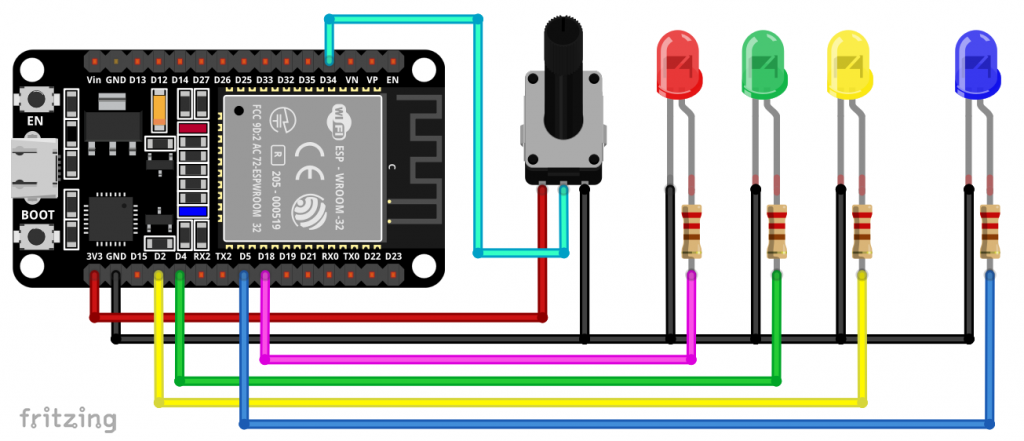
We set the bar higher by switching three LEDs, dimming one LED via PWM and query the voltage on one pin. This still leaves us with (almost) pure HTML code. We’ll make it nicer and more user-friendly later.
Switching / controlling the LEDs
Switching three LEDs is actually just a bit more paperwork. The principle remains the same, except that we handle the LED pins and the LED status (ledOn) as an array. As before, each switching operation has its own directory, i.e. /led0_on, /led0_off, /led1_on etc.
We pass the PWM value using a form (<form>...</form>). As I have set the PWM resolution to 255, a analogWrite() would also have been sufficient here. However, this way you can also apply the code to other PWM applications.
Querying and displaying the analogueRead() value
Determining and outputting the voltage of just one pin is simple. However, this raises the question of how to update the voltage automatically. In principle, you can reload the whole page periodically by inserting <html><head><meta http-equiv='refresh' content='5'></head> (for 5 seconds) at the beginning of the web page. However, this clashes with the PWM input. If the refresh occurs while you are inputting, your input field will be empty again.
One solution is using an iframe (= inline frame). This is another website embedded in the website, so to speak. If you only apply the refresh to the embedded web page, it will not interfere with the rest.
But here’s the sketch first:
#include <WiFi.h>
#include <AsyncTCP.h>
#include <ESPAsyncWebServer.h>

IPAddress ip(192,168,178,112);  //TODO
IPAddress gateway(192,168,178,1);  //TODO
IPAddress subnet(255,255,255,0);  //TODO

constexpr char WIFI_SSID[] = "Your SSID";  //TODO
constexpr char WIFI_PASS[] = "Your password";  //TODO

const int ledPin[] = {2,4,18};
const int analogReadPin = 34;
const int pwmLedPin = 5;
int pwmValue = 0;
bool ledOn[] = {false, false, false};

AsyncWebServer server(80);

void setLed(int num, bool on) {
  ledOn[num] = on;
  digitalWrite(ledPin[num], on);
}

String page() {
  String myPage = "";
  for(int i=0; i<3; i++){
    if (ledOn[i]) {
      myPage += String(F("<a href=\"/led"));
      myPage += String(i);
      myPage += String(F("_off\">Switch LED "));
      myPage += String(i);
      myPage += String(F(" off</a></BR></BR>"));
    } else {
      myPage += String(F("<a href=\"/led"));
      myPage += String(i);
      myPage += String(F("_on\">Switch LED "));
      myPage += String(i);
      myPage += String(F(" on</a></BR></BR>"));
    }
  }

  myPage += "</BR><form action='/set'>";
  myPage += "PWM: <input name='value' type='number' min='0' max='255'>";
  myPage += "<input type='submit' value='Submit'>";
  myPage += "</form>";
  myPage += "Current PWM value: ";
  myPage += String(pwmValue);

  myPage += "</BR></BR></BR>";
  myPage += "<iframe src='/value' width='200' height='40' frameborder='0'></iframe></BR></BR>";

  return myPage;
}

void connectWiFi() {
  WiFi.mode(WIFI_STA);
  WiFi.config(ip, gateway, subnet);
  WiFi.begin(WIFI_SSID, WIFI_PASS);
  Serial.printf("Connecting to %s", WIFI_SSID);
  while (WiFi.status() != WL_CONNECTED) {
    delay(250); Serial.print(".");
  }
  Serial.println();
  Serial.print("IP: "); Serial.println(WiFi.localIP());
}

void setup() {
  Serial.begin(115200);

  for(int i=0; i<3; i++) {
    pinMode(ledPin[i], OUTPUT);
    setLed(i, false);
  }
  pinMode(analogReadPin, INPUT);
  ledcAttach(pwmLedPin, 5000, 8);

  connectWiFi();

  server.on("/", HTTP_GET, [](AsyncWebServerRequest *req){
    req->send(200, "text/html", page());
  });

  server.on("/led0_on", HTTP_GET, [](AsyncWebServerRequest *req){
    setLed(0, true);
    req->send(200, "text/html", page());
    // req->redirect("/"); // alternative to the line above
  });

  server.on("/led0_off", HTTP_GET, [](AsyncWebServerRequest *req){
    setLed(0, false);
    req->send(200, "text/html", page());
    // req->redirect("/"); // alternative to the line above
  });

  server.on("/led1_on", HTTP_GET, [](AsyncWebServerRequest *req){
    setLed(1, true);
    req->send(200, "text/html", page());
    // req->redirect("/"); // alternative to the line above
  });

  server.on("/led1_off", HTTP_GET, [](AsyncWebServerRequest *req){
    setLed(1, false);
    req->send(200, "text/html", page());
    // req->redirect("/"); // alternative to the line above
  });

  server.on("/led2_on", HTTP_GET, [](AsyncWebServerRequest *req){
    setLed(2, true);
    req->send(200, "text/html", page());
    // req->redirect("/"); // alternative to the line above
  });

  server.on("/led2_off", HTTP_GET, [](AsyncWebServerRequest *req){
    setLed(2, false);
    req->send(200, "text/html", page());
    // req->redirect("/"); // alternative to the line above
  });

  server.on("/set", HTTP_GET, [](AsyncWebServerRequest *request){
    if (request->hasParam("value")) {
      pwmValue = request->getParam("value")->value().toInt();
      pwmValue = constrain(pwmValue, 0, 255);
      ledcWrite(pwmLedPin, pwmValue);
      request->send(200, "text/html", page());
      // req->redirect("/"); // alternative to the line above
    }
  });

  server.on("/value", HTTP_GET, [](AsyncWebServerRequest *req){
    float voltage = 3.3 * analogRead(analogReadPin) / 4096.0;
    String html = "";
    html += "<html><head><meta http-equiv='refresh' content='5'></head>";
    html += "<body style='margin:0; padding:0; text-align:left;'>";
    html += "Voltage [V]: ";
    html += String(voltage, 2);
    html += "</body></html>";

  req->send(200, "text/html", html);
  });

  server.begin();
  Serial.println("Server ready.");
}

void loop() {}
However, I should explain one more point, namely how the PWM value makes it from the form into the request.
With request->hasParam("value"), the web server checks whether the HTTP request contains a parameter with the name value, which comes from the input field of the HTML form. request->getParam("value")->value() reads the text entered by the user from this form field. toInt() then converts this text into an integer.
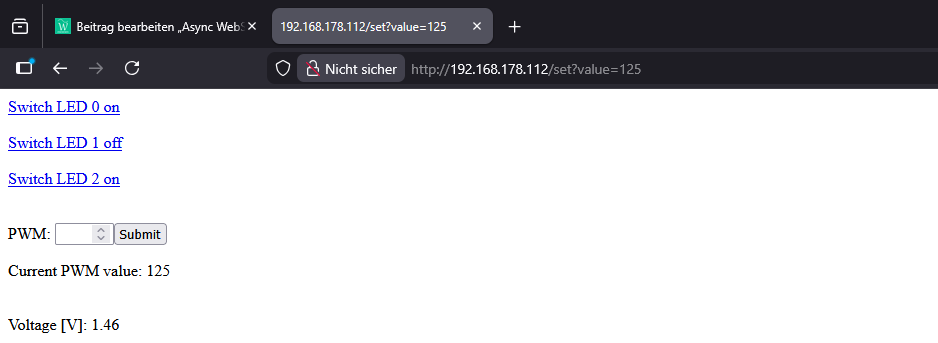
And this is what the output looks like in my browser:
More beautiful with CSS
HTML offers many design options. However, this can quickly make the code confusing. The solution to this is CSS (Cascading Style Sheets).
CSS definitions are stored separately from the actual page content (<body>...</body>) in the header area of the web document (<head>...</head>) within a separate section (<style>...</style>) or in an external file.
Basically, there are two main things you can do with CSS:
- Make global settings for existing HTML elements:
- e.g. for the h1 heading:
h1 { font-size: 24px; margin: 0 0 10px 0; text-align: center; }
The advantage: The definition only needs to be made once and then applies to all corresponding elements.
- e.g. for the h1 heading:
- Define your own classes:
- e.g. a subheading:
.subtitle { text-align: center; font-size: 13px; color: #666; margin-bottom: 20px; }
- e.g. a subheading:
The classes can then be used in HTML elements, e.g.: <div class="subtitle">...</div>. It is also possible to combine several classes.
Not familiar with CSS and don’t have the time or inclination to familiarize yourself with it? No problem in times of artificial intelligence. I also used ChatGPT for the visual design. ChatGPT may have one or two gaps in its knowledge, but my experience with this AI for programming HTML, CSS and JavaScript is extremely good. Nevertheless, it is, of course, always better to have at least basic knowledge.
#include <WiFi.h>
#include <AsyncTCP.h>
#include <ESPAsyncWebServer.h>
IPAddress ip(192,168,178,112); //TODO
IPAddress gateway(192,168,178,1); //TODO
IPAddress subnet(255,255,255,0); //TODO
constexpr char WIFI_SSID[] = "Your SSID"; //TODO
constexpr char WIFI_PASS[] = "Your Password"; //TODO
const int ledPin[] = {2,4,18};
const int analogReadPin = 34;
const int pwmLedPin = 5;
int pwmValue = 0;
bool ledOn[] = {false, false, false};
AsyncWebServer server(80);
void setLed(int num, bool on) {
ledOn[num] = on;
digitalWrite(ledPin[num], on);
}
String page() {
String myPage = "";
// head + CSS + container start
myPage += F(
"<!DOCTYPE html><html><head><meta charset='UTF-8'>"
"<meta name='viewport' content='width=device-width, initial-scale=1.0'>"
"<title>ESP32 LED & PWM Control</title>"
"<style>"
"body{font-family:Arial,Helvetica,sans-serif;background:#f0f2f5;margin:0;padding:0;}"
".container{max-width:600px;margin:40px auto;padding:20px;background:#ffffff;"
"border-radius:12px;box-shadow:0 4px 12px rgba(0,0,0,0.08);}"
"h1{font-size:24px;margin:0 0 10px 0;text-align:center;}"
".subtitle{text-align:center;font-size:13px;color:#666;margin-bottom:20px;}"
".section{margin:20px 0;}"
".section-title{font-weight:bold;margin-bottom:8px;font-size:15px;color:#333;}"
".led-grid{display:flex;gap:12px;justify-content:center;}"
".led-tile{flex:1;padding:18px 10px;text-align:center;border-radius:10px;"
"font-weight:bold;text-decoration:none;color:#ffffff;"
"transition:background-color 0.2s,transform 0.1s,box-shadow 0.1s;"
"box-shadow:0 2px 4px rgba(0,0,0,0.1);font-size:14px;}"
".led-on{background:#e53935;}"
".led-on:hover{background:#b71c1c;}"
".led-off{background:#43a047;}"
".led-off:hover{background:#1b5e20;}"
".led-tile:active{transform:translateY(1px);box-shadow:0 1px 2px rgba(0,0,0,0.2);}"
".pwm-form{display:flex;flex-direction:column;gap:8px;}"
".pwm-form label{font-size:14px;color:#333;}"
".pwm-form input[type='number']{width:100%;padding:8px 10px;border-radius:6px;"
"border:1px solid #ccc;box-sizing:border-box;font-size:14px;}"
".pwm-form input[type='submit']{align-self:flex-start;padding:8px 14px;border:none;"
"border-radius:6px;cursor:pointer;background:#1976d2;color:#ffffff;font-weight:bold;font-size:14px;"
"transition:background-color 0.2s;}"
".pwm-form input[type='submit']:hover{background:#0d47a1;}"
".pwm-value{margin-top:6px;font-size:14px;color:#333;}"
".voltage-box{background:#1565c0;border-radius:10px;padding:8px 10px;}"
".voltage-box iframe{border:0;width:100%;height:50px;}"
"</style>"
"</head><body><div class='container'>"
"<h1>ESP32 LED & PWM Control</h1>"
"<div class='subtitle'>Control LEDs, set LED brightness and display voltage</div>"
"<div class='section'><div class='section-title'>LEDs</div>"
"<div class='led-grid'>"
);
// LED icons
for(int i=0; i<3; i++){
if (ledOn[i]) {
myPage += String(F("<a href=\"/led"));
myPage += String(i);
myPage += String(F("_off\" class='led-tile led-on'>LED "));
myPage += String(i);
myPage += String(F(" is ON</a>"));
} else {
myPage += String(F("<a href=\"/led"));
myPage += String(i);
myPage += String(F("_on\" class='led-tile led-off'>LED "));
myPage += String(i);
myPage += String(F(" is OFF</a>"));
}
}
myPage += F("</div></div>"); // Ende LED-Section
// PWM section
myPage += F(
"<div class='section'><div class='section-title'>PWM for LED (Pin 5)</div>"
"<form class='pwm-form' action='/set'>"
"<label for='pwmInput'>PWM value (0 – 255):</label>"
"<input id='pwmInput' name='value' type='number' min='0' max='255' placeholder='e.g. 128'>"
"<input type='submit' value='Set PWM'>"
"</form>"
);
myPage += F("<div class='pwm-value'>Current PWM value: ");
myPage += String(pwmValue);
myPage += F("</div></div>");
// voltage section
myPage += F(
"<div class='section'><div class='section-title'>Voltage at Pin 34</div>"
"<div class='voltage-box'>"
"<iframe src='/value'></iframe>"
"</div></div>"
);
// page end
myPage += F("</div></body></html>");
return myPage;
}
void connectWiFi() {
WiFi.mode(WIFI_STA);
WiFi.config(ip, gateway, subnet);
WiFi.begin(WIFI_SSID, WIFI_PASS);
Serial.printf("Connecting to %s", WIFI_SSID);
while (WiFi.status() != WL_CONNECTED) {
delay(250); Serial.print(".");
}
Serial.println();
Serial.print("IP: "); Serial.println(WiFi.localIP());
}
void setup() {
Serial.begin(115200);
for(int i=0; i<3; i++) {
pinMode(ledPin[i], OUTPUT);
setLed(i, false);
}
pinMode(analogReadPin, INPUT);
ledcAttach(pwmLedPin, 5000, 8);
connectWiFi();
server.on("/", HTTP_GET, [](AsyncWebServerRequest *req){
req->send(200, "text/html", page());
});
server.on("/led0_on", HTTP_GET, [](AsyncWebServerRequest *req){
setLed(0, true);
req->send(200, "text/html", page());
// req->redirect("/"); // alternative to the line above
});
server.on("/led0_off", HTTP_GET, [](AsyncWebServerRequest *req){
setLed(0, false);
req->send(200, "text/html", page());
// req->redirect("/"); // alternative to the line above
});
server.on("/led1_on", HTTP_GET, [](AsyncWebServerRequest *req){
setLed(1, true);
req->send(200, "text/html", page());
// req->redirect("/"); // alternative to the line above
});
server.on("/led1_off", HTTP_GET, [](AsyncWebServerRequest *req){
setLed(1, false);
req->send(200, "text/html", page());
// req->redirect("/"); // alternative to the line above
});
server.on("/led2_on", HTTP_GET, [](AsyncWebServerRequest *req){
setLed(2, true);
req->send(200, "text/html", page());
// req->redirect("/"); // alternative to the line above
});
server.on("/led2_off", HTTP_GET, [](AsyncWebServerRequest *req){
setLed(2, false);
req->send(200, "text/html", page());
// req->redirect("/"); // alternative to the line above
});
server.on("/set", HTTP_GET, [](AsyncWebServerRequest *request){
if (request->hasParam("value")) {
pwmValue = request->getParam("value")->value().toInt();
pwmValue = constrain(pwmValue, 0, 255);
ledcWrite(pwmLedPin, pwmValue);
request->send(200, "text/html", page());
// req->redirect("/"); // alternative to the line above
}
});
server.on("/value", HTTP_GET, [](AsyncWebServerRequest *req){
float voltage = 3.3 * analogRead(analogReadPin) / 4096.0;
String html = "";
html += "<html><head><meta http-equiv='refresh' content='5'>";
html += "<meta charset='UTF-8'><style>";
html += "body{margin:0;font-family:Arial,Helvetica,sans-serif;}";
html += ".voltage-box{background:#1565c0;color:#ffffff;padding:8px 10px;";
html += "display:flex;align-items:center;justify-content:space-between;";
html += "height:100%;box-sizing:border-box;font-size:14px;}";
html += ".label{font-weight:bold;margin-right:8px;}";
html += "</style></head>";
html += "<body><div class='voltage-box'><span class='label'>Voltage [V]:</span><span>";
html += String(voltage, 2);
html += "</span></div></body></html>";
req->send(200, "text/html", html);
});
server.begin();
Serial.println("Server ready.");
}
void loop() {}
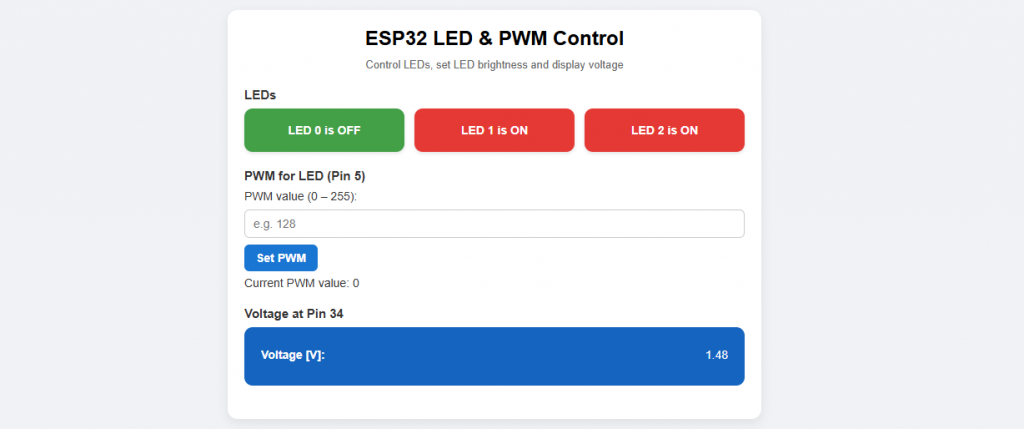
Here is the result:
More convenient with JavaScript
In addition to HTML and CSS, there is also JavaScript for website design. As the name suggests, this is a scripting language. JavaScript makes interacting with the website even more convenient and effective. I use JavaScript in the following sketch for the LED buttons and replace the input of the PWM value with a slider. JavaScript code is inserted within a <script>...</script> element.
A nice effect of the JavaScript code is that in this version the page does not have to be rebuilt again and again. Where previously the whole page was returned:
Again, no problem if you are not familiar with JavaScript. ChatGPT can do that for you. I also only have basic knowledge of JavaScript.
#include <WiFi.h>
#include <AsyncTCP.h>
#include <ESPAsyncWebServer.h>
IPAddress ip(192,168,178,112); //TODO
IPAddress gateway(192,168,178,1); //TODO
IPAddress subnet(255,255,255,0); //TODO
constexpr char WIFI_SSID[] = "Your SSID"; //TODO
constexpr char WIFI_PASS[] = "Your password"; //TODO
const int ledPin[] = {2, 4, 18};
const int analogReadPin = 34;
const int pwmLedPin = 5;
int pwmValue = 0;
bool ledOn[] = {false, false, false};
AsyncWebServer server(80);
void setLed(int num, bool on) {
ledOn[num] = on;
digitalWrite(ledPin[num], on);
}
String page() {
String myPage;
myPage += F(
"<!DOCTYPE html><html><head><meta charset='UTF-8'>"
"<meta name='viewport' content='width=device-width, initial-scale=1.0'>"
"<title>ESP32 LED & PWM Control</title>"
"<style>"
"body{font-family:Arial,Helvetica,sans-serif;background:#f0f2f5;margin:0;padding:0;}"
".container{max-width:600px;margin:40px auto;padding:20px;background:#ffffff;"
"border-radius:12px;box-shadow:0 4px 12px rgba(0,0,0,0.08);}"
"h1{font-size:24px;margin:0 0 10px 0;text-align:center;}"
".subtitle{text-align:center;font-size:13px;color:#666;margin-bottom:20px;}"
".section{margin:20px 0;}"
".section-title{font-weight:bold;margin-bottom:8px;font-size:15px;color:#333;}"
".led-grid{display:flex;gap:12px;justify-content:center;}"
".led-button{flex:1;padding:18px 10px;text-align:center;border-radius:10px;"
"font-weight:bold;border:none;cursor:pointer;color:#ffffff;"
"transition:background-color 0.2s,transform 0.1s,box-shadow 0.1s;"
"box-shadow:0 2px 4px rgba(0,0,0,0.1);font-size:14px;}"
".led-on{background:#e53935;}"
".led-on:hover{background:#b71c1c;}"
".led-off{background:#43a047;}"
".led-off:hover{background:#1b5e20;}"
".led-button:active{transform:translateY(1px);box-shadow:0 1px 2px rgba(0,0,0,0.2);}"
".pwm-form{display:flex;flex-direction:column;gap:8px;}"
".pwm-form label{font-size:14px;color:#333;}"
".pwm-form input[type='range']{width:100%;}"
".voltage-box{background:#1565c0;border-radius:10px;padding:8px 10px;}"
".voltage-box iframe{border:0;width:100%;height:50px;}"
"</style>"
"</head><body><div class='container'>"
"<h1>ESP32 LED & PWM Control</h1>"
"<div class='subtitle'>Control LEDs, set LED brightness and display voltage</div>"
"<div class='section'><div class='section-title'>LEDs</div>"
"<div class='led-grid'>"
);
// LED Buttons
for (int i = 0; i < 3; i++) {
myPage += "<button type='button' class='led-button ";
if (ledOn[i]) {
myPage += "led-on";
} else {
myPage += "led-off";
}
myPage += "' data-index='";
myPage += String(i);
myPage += "' data-state='";
myPage += (ledOn[i] ? "1" : "0");
myPage += "'>";
myPage += "LED ";
myPage += String(i);
myPage += (ledOn[i] ? " is ON" : " is OFF");
myPage += "</button>";
}
myPage += F("</div></div>"); // Ende LED-Section
// PWM section (Slider)
myPage += F(
"<div class='section'><div class='section-title'>PWM for LED (Pin 5)</div>"
"<div class='pwm-form'>"
"<label for='pwmSlider'>PWM value (0 – 255): <span id='pwmValueLabel'></span></label>"
);
myPage += "<input id='pwmSlider' type='range' min='0' max='255' value='";
myPage += String(pwmValue);
myPage += "'>";
myPage += F("</div></div>");
// Voltage section (iframe)
myPage += F(
"<div class='section'><div class='section-title'>Voltage at Pin 34</div>"
"<div class='voltage-box'>"
"<iframe src='/value'></iframe>"
"</div></div>"
);
// JavaScript for buttons & slider
myPage += F(
"<script>"
"document.addEventListener('DOMContentLoaded', function(){"
"// LED Buttons\n"
"var ledButtons = document.querySelectorAll('.led-button');"
"ledButtons.forEach(function(btn){"
"btn.addEventListener('click', function(){"
"var index = btn.getAttribute('data-index');"
"var state = btn.getAttribute('data-state') === '1';"
"var url = '/led' + index + '_' + (state ? 'off' : 'on');"
"fetch(url)"
".then(function(){"
"var newState = !state;"
"btn.setAttribute('data-state', newState ? '1' : '0');"
"btn.classList.toggle('led-on', newState);"
"btn.classList.toggle('led-off', !newState);"
"btn.textContent = 'LED ' + index + (newState ? ' is ON' : ' is OFF');"
"})"
".catch(function(err){console.error(err);});"
"});"
"});"
"// PWM Slider\n"
"var slider = document.getElementById('pwmSlider');"
"var valueLabel = document.getElementById('pwmValueLabel');"
"if(slider && valueLabel){"
"var updateLabel = function(v){"
"valueLabel.textContent = v;"
"};"
"updateLabel(slider.value);"
"slider.addEventListener('input', function(e){"
"updateLabel(e.target.value);"
"});"
"slider.addEventListener('change', function(e){"
"var v = e.target.value;"
"fetch('/set?value=' + v)"
".catch(function(err){console.error(err);});"
"});"
"}"
"});"
"</script>"
);
myPage += F("</div></body></html>");
return myPage;
}
void connectWiFi() {
WiFi.mode(WIFI_STA);
WiFi.config(ip, gateway, subnet);
WiFi.begin(WIFI_SSID, WIFI_PASS);
Serial.printf("Connecting to %s", WIFI_SSID);
while (WiFi.status() != WL_CONNECTED) {
delay(250);
Serial.print(".");
}
Serial.println();
Serial.print("IP: ");
Serial.println(WiFi.localIP());
}
void setup() {
Serial.begin(115200);
for (int i = 0; i < 3; i++) {
pinMode(ledPin[i], OUTPUT);
setLed(i, false);
}
pinMode(analogReadPin, INPUT);
// PWM initialization
ledcAttach(pwmLedPin, 5000, 8);
connectWiFi();
server.on("/", HTTP_GET, [](AsyncWebServerRequest *req){
req->send(200, "text/html", page());
});
// LED endpoint: only "OK" is send, no complete refresh
server.on("/led0_on", HTTP_GET, [](AsyncWebServerRequest *req){
setLed(0, true);
req->send(200, "text/plain", "OK");
});
server.on("/led0_off", HTTP_GET, [](AsyncWebServerRequest *req){
setLed(0, false);
req->send(200, "text/plain", "OK");
});
server.on("/led1_on", HTTP_GET, [](AsyncWebServerRequest *req){
setLed(1, true);
req->send(200, "text/plain", "OK");
});
server.on("/led1_off", HTTP_GET, [](AsyncWebServerRequest *req){
setLed(1, false);
req->send(200, "text/plain", "OK");
});
server.on("/led2_on", HTTP_GET, [](AsyncWebServerRequest *req){
setLed(2, true);
req->send(200, "text/plain", "OK");
});
server.on("/led2_off", HTTP_GET, [](AsyncWebServerRequest *req){
setLed(2, false);
req->send(200, "text/plain", "OK");
});
// PWM endpoint, now for the slider
server.on("/set", HTTP_GET, [](AsyncWebServerRequest *request){
if (request->hasParam("value")) {
pwmValue = request->getParam("value")->value().toInt();
pwmValue = constrain(pwmValue, 0, 255);
ledcWrite(pwmLedPin, pwmValue);
request->send(200, "text/plain", "OK");
} else {
request->send(400, "text/plain", "Missing value");
}
});
// Voltage page, kept iframe
server.on("/value", HTTP_GET, [](AsyncWebServerRequest *req){
float voltage = 3.3 * analogRead(analogReadPin) / 4096.0;
String html = "";
html += "<html><head><meta http-equiv='refresh' content='5'>";
html += "<meta charset='UTF-8'><style>";
html += "body{margin:0;font-family:Arial,Helvetica,sans-serif;}";
html += ".voltage-box{background:#1565c0;color:#ffffff;padding:8px 10px;";
html += "display:flex;align-items:center;justify-content:space-between;";
html += "height:100%;box-sizing:border-box;font-size:14px;}";
html += ".label{font-weight:bold;margin-right:8px;}";
html += "</style></head>";
html += "<body><div class='voltage-box'><span class='label'>Voltage [V]:</span><span>";
html += String(voltage, 2);
html += "</span></div></body></html>";
req->send(200, "text/html", html);
});
server.begin();
Serial.println("Server ready.");
}
void loop() {}
Here is the result:
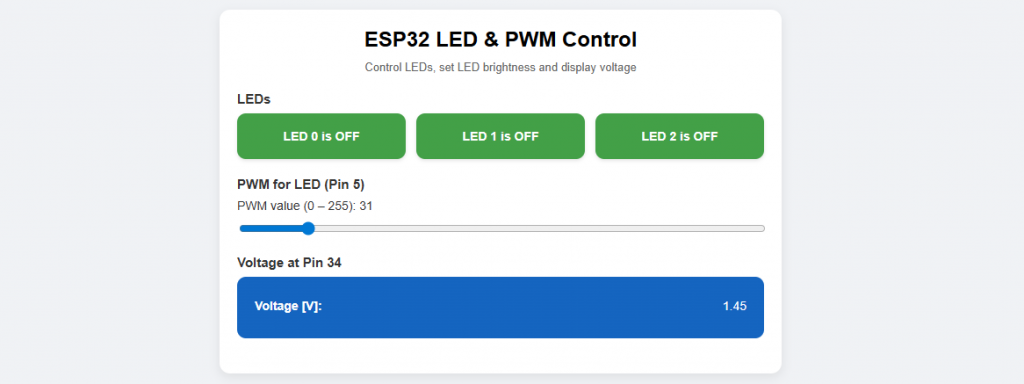
Alternative version of the sketch with JavaScript
Or would you like a different style for the LED buttons? That’s in the next sketch. I have also changed the method of the voltage update here. Instead of the iframe, JavaScript with a “fetch” function is used here. The update interval is set with setInterval(updateVoltage, 5000);.
#include <WiFi.h>
#include <AsyncTCP.h>
#include <ESPAsyncWebServer.h>
IPAddress ip(192,168,178,112); //TODO
IPAddress gateway(192,168,178,1); //TODO
IPAddress subnet(255,255,255,0); //TODO
constexpr char WIFI_SSID[] = "Your SSID"; //TODO
constexpr char WIFI_PASS[] = "Your Password"; //TODO
const int ledPin[] = {2, 4, 18};
const int analogReadPin = 34;
const int pwmLedPin = 5;
int pwmValue = 0;
bool ledOn[] = {false, false, false};
AsyncWebServer server(80);
void setLed(int num, bool on) {
ledOn[num] = on;
digitalWrite(ledPin[num], on);
}
String page() {
String myPage;
myPage += F(
"<!DOCTYPE html><html><head><meta charset='UTF-8'>"
"<meta name='viewport' content='width=device-width, initial-scale=1.0'>"
"<title>ESP32 LED & PWM Control</title>"
"<style>"
"body{font-family:Arial,Helvetica,sans-serif;background:#f0f2f5;margin:0;padding:0;}"
".container{max-width:600px;margin:40px auto;padding:20px;background:#ffffff;"
"border-radius:12px;box-shadow:0 4px 12px rgba(0,0,0,0.08);}"
"h1{font-size:24px;margin:0 0 10px 0;text-align:center;}"
".subtitle{text-align:center;font-size:13px;color:#666;margin-bottom:20px;}"
".section{margin:20px 0;}"
".section-title{font-weight:bold;margin-bottom:8px;font-size:15px;color:#333;}"
/* LED rows + switches */
".led-list{display:flex;flex-direction:column;gap:10px;}"
".led-row{display:flex;align-items:center;justify-content:space-between;"
"padding:10px 12px;border-radius:8px;background:#f7f7f7;}"
".led-label{font-size:14px;font-weight:bold;color:#333;}"
/* LED switch toggle */
".switch{position:relative;display:inline-block;width:46px;height:24px;}"
".switch input{opacity:0;width:0;height:0;}"
".slider{position:absolute;cursor:pointer;top:0;left:0;right:0;bottom:0;"
"background-color:#ccc;transition:.2s;border-radius:24px;}"
".slider:before{position:absolute;content:'';height:18px;width:18px;"
"left:3px;bottom:3px;background-color:white;transition:.2s;border-radius:50%;}"
"input:checked + .slider{background-color:#43a047;}" /* ON color */
"input:checked + .slider:before{transform:translateX(22px);}"
".pwm-form{display:flex;flex-direction:column;gap:8px;}"
".pwm-form label{font-size:14px;color:#333;}"
".pwm-form input[type='range']{width:100%;}"
".voltage-box{background:#1565c0;border-radius:10px;padding:8px 10px;"
"color:#ffffff;display:flex;align-items:center;justify-content:space-between;}"
".label{font-weight:bold;margin-right:8px;}"
"</style>"
"</head><body><div class='container'>"
"<h1>ESP32 LED & PWM Control</h1>"
"<div class='subtitle'>Control LEDs, set LED brightness and display voltage</div>"
"<div class='section'><div class='section-title'>LEDs</div>"
"<div class='led-list'>"
);
for (int i = 0; i < 3; i++) {
myPage += "<div class='led-row'>";
myPage += "<span class='led-label'>LED ";
myPage += String(i);
myPage += "</span>";
myPage += "<label class='switch'>";
myPage += "<input type='checkbox' class='led-toggle' data-index='";
myPage += String(i);
myPage += "'";
if (ledOn[i]) {
myPage += " checked";
}
myPage += ">";
myPage += "<span class='slider'></span>";
myPage += "</label>";
myPage += "</div>";
}
myPage += F("</div></div>"); // end LED switches
// PWM section (Slider)
myPage += F(
"<div class='section'><div class='section-title'>PWM for LED (Pin 5)</div>"
"<div class='pwm-form'>"
"<label for='pwmSlider'>PWM value (0 – 255): <span id='pwmValueLabel'></span></label>"
);
myPage += "<input id='pwmSlider' type='range' min='0' max='255' value='";
myPage += String(pwmValue);
myPage += "'>";
myPage += F("</div></div>");
// Voltage section (JSON + fetch)
myPage += F(
"<div class='section'><div class='section-title'>Voltage at Pin 34</div>"
"<div class='voltage-box'>"
"<span class='label'>Voltage [V]:</span>"
"<span id='voltageValue'>--.--</span>"
"</div></div>"
);
// JavaScript for LEDs, PWM slider & voltage update
myPage += F(
"<script>"
"document.addEventListener('DOMContentLoaded', function(){"
"// LED Toggles\n"
"var toggles = document.querySelectorAll('.led-toggle');"
"toggles.forEach(function(cb){"
"cb.addEventListener('change', function(){"
"var index = cb.getAttribute('data-index');"
"var state = cb.checked ? 1 : 0;"
"fetch('/api/led?index=' + index + '&state=' + state)"
".then(function(res){"
"if(!res.ok) throw new Error('LED request failed');"
"})"
".catch(function(err){"
"console.error(err);"
"cb.checked = !cb.checked;"
"});"
"});"
"});"
"// PWM Slider\n"
"var slider = document.getElementById('pwmSlider');"
"var valueLabel = document.getElementById('pwmValueLabel');"
"if(slider && valueLabel){"
"var updateLabel = function(v){"
"valueLabel.textContent = v;"
"};"
"updateLabel(slider.value);"
"slider.addEventListener('input', function(e){"
"updateLabel(e.target.value);"
"});"
"slider.addEventListener('change', function(e){"
"var v = e.target.value;"
"fetch('/set?value=' + v)"
".catch(function(err){console.error(err);});"
"});"
"}"
"// Voltage via JSON + fetch\n"
"var voltageSpan = document.getElementById('voltageValue');"
"function updateVoltage(){"
"fetch('/api/voltage')"
".then(function(res){"
"if(!res.ok) throw new Error('Voltage request failed');"
"return res.json();"
"})"
".then(function(data){"
"if(voltageSpan && typeof data.voltage === 'number'){"
"voltageSpan.textContent = data.voltage.toFixed(2);"
"}"
"})"
".catch(function(err){console.error(err);});"
"}"
"updateVoltage();"
"setInterval(updateVoltage, 5000);"
"});"
"</script>"
);
myPage += F("</div></body></html>");
return myPage;
}
void connectWiFi() {
WiFi.mode(WIFI_STA);
WiFi.config(ip, gateway, subnet);
WiFi.begin(WIFI_SSID, WIFI_PASS);
Serial.printf("Connecting to %s", WIFI_SSID);
while (WiFi.status() != WL_CONNECTED) {
delay(250);
Serial.print(".");
}
Serial.println();
Serial.print("IP: ");
Serial.println(WiFi.localIP());
}
void setup() {
Serial.begin(115200);
for (int i = 0; i < 3; i++) {
pinMode(ledPin[i], OUTPUT);
setLed(i, false);
}
pinMode(analogReadPin, INPUT);
ledcAttach(pwmLedPin, 5000, 8);
connectWiFi();
server.on("/", HTTP_GET, [](AsyncWebServerRequest *req){
req->send(200, "text/html", page());
});
// generic LED endpoint: /api/led?index=0&state=1
server.on("/api/led", HTTP_GET, [](AsyncWebServerRequest *req){
if (req->hasParam("index") && req->hasParam("state")) {
int index = req->getParam("index")->value().toInt();
int state = req->getParam("state")->value().toInt();
if (index >= 0 && index < 3) {
setLed(index, state != 0);
req->send(200, "text/plain", "OK");
} else {
req->send(400, "text/plain", "Invalid index");
}
} else {
req->send(400, "text/plain", "Missing index or state");
}
});
// PWM endpoint
server.on("/set", HTTP_GET, [](AsyncWebServerRequest *request){
if (request->hasParam("value")) {
pwmValue = request->getParam("value")->value().toInt();
pwmValue = constrain(pwmValue, 0, 255);
ledcWrite(pwmLedPin, pwmValue);
request->send(200, "text/plain", "OK");
} else {
request->send(400, "text/plain", "Missing value");
}
});
// JSON endpoint for voltage
server.on("/api/voltage", HTTP_GET, [](AsyncWebServerRequest *req){
float voltage = 3.3 * analogRead(analogReadPin) / 4096.0;
String json = "{\"voltage\":";
json += String(voltage, 3);
json += "}";
req->send(200, "application/json", json);
});
server.begin();
Serial.println("Server ready.");
}
void loop() {}
Here is the output in the browser:
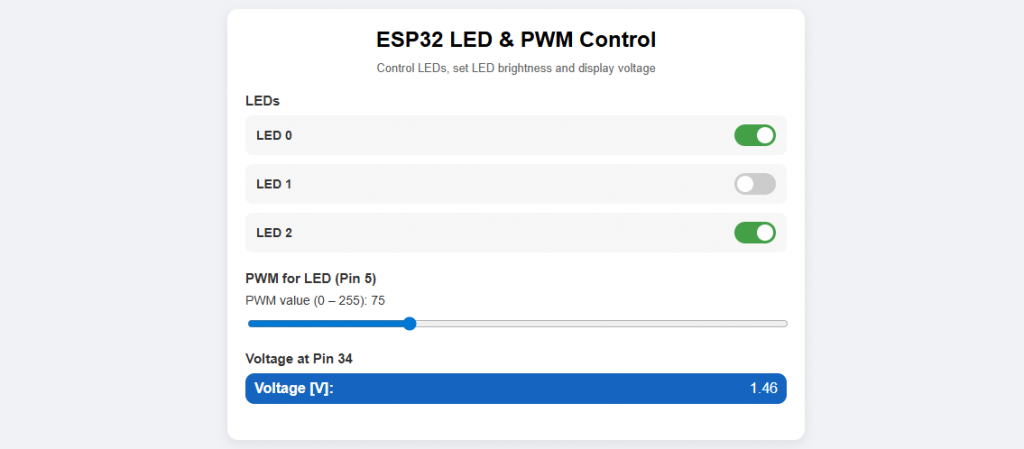
As you can see, the whole thing no longer has much to do with the actual topic, the Async WebServer. The complexity of the last sketches is rather due to their HTML, CSS and JavaScript content.
Controlling multiple ESP32s
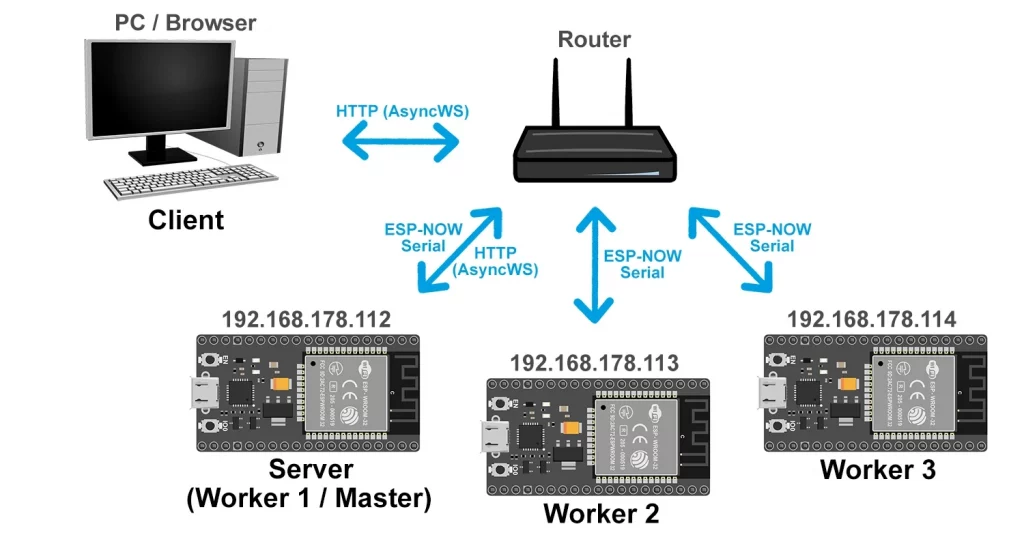
If you want to control several ESP32s, you could create a web page for each of them. But that would be rather inconvenient. To combine everything on one website, use one of the ESP32 boards as the master. The other ESP32 boards (the “workers”) serve the master. However, the master also takes on worker tasks and therefore has a dual role. In relation to the device that displays the website, the master ESP32 is the server.
There are various ways in which the workers and the master communicate with each other. I would like to introduce the following:
- The workers are Async WebServers. Accordingly, the master is a client in relation to the workers.
- Communication between master and client via ESP-NOW Serial(see article). ESP-NOW(see article) works in the same way, but ESP-NOW Serial is somewhat easier to use and is sufficient for this purpose.
- All communication is via the router. The ESP32 boards work in STA mode and are part of the router’s network.
- The master ESP32 works in combined STA and AP mode. It connects to the router’s network, but also provides a network itself into which the workers can connect. The workers only “see” the master ESP32.
To focus on the essential aspects in this section, I will not use CSS and JavaScript in the following examples. You can do this yourself according to your wishes – or consult an AI. We also only switch one LED per board. PWM control and voltage measurement are retained. We have dispensed with automatic updating of the voltage value here.
At the very end of the article there is a more stylish version with CSS, JavaScript and automatic refresh.
Option 1: Everything via HTTP (Async WebServer)
In this variant, Master-ESP32 is a server for the PC and a client for the workers. All ESP32 boards receive their IP address from the router.
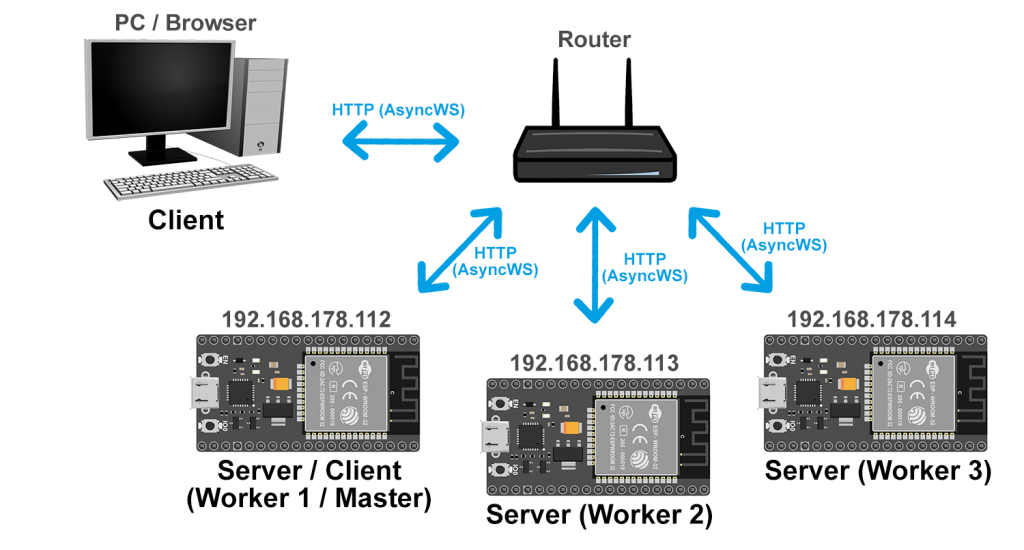
Now we need three sketches, namely one for the master/worker 1 and one each for worker 2 and worker 3, whereby the latter only differ slightly.
Concept of the sketch for the Master/Worker 1
Switching and dimming the LEDs and determining the voltage on the master/worker 1 are nothing new in principle. Clicking on the corresponding links and sending the PWM value triggers the functions setLocalLed(), setLocalPwm() and readLocalVoltage().
Things get more interesting when controlling workers 2 and 3. Clicking on the links to switch the LEDs and sending a PWM value leads to the helper function callWorkerSimple(url). The URL is made up of the IP of the called worker, the relevant directory and the value.
The voltage values are queried for two seconds in loop(). The function
is executed for this purpose. Within this function, the voltages of the workers are determined via the helper function readWorker(url). Here, the URL consists of the IP of the worker and the voltage directory. However, the measured values in the browser are only updated when you click on the “Refresh page” link.
What our browser does automatically when we call up a website, we now have to do “manually”, namely send a GET request. This is done by the helper functions. However, for the master to be able to send a GET request at all, it must become a client. An HTTP client object is created for this purpose. This is also done by the helper functions.
Concept of the sketch for the Worker 2 and Worker 3
The sketches for Worker 2 and Worker 3 contain nothing new. They generate an Async WebServer that responds to the client’s requests. They themselves do not take care of the visual display in the browser, but switch and dim the LED and return the voltage value.
#include <WiFi.h>
#include <AsyncTCP.h>
#include <ESPAsyncWebServer.h>
#include <HTTPClient.h>

IPAddress ip(192,168,178,112);  //TODO
IPAddress gateway(192,168,178,1);  //TODO
IPAddress subnet(255,255,255,0);  //TODO

constexpr char WIFI_SSID[] = "Your SSID";  //TODO
constexpr char WIFI_PASS[] = "Your password";  //TODO

// IP addresses of the two worker ESP32 boards
const char* ESP2_IP = "192.168.178.113";  //TODO
const char* ESP3_IP = "192.168.178.114";  //TODO

// Local pins on the master (also acts as worker)
const int LED_PIN     = 2;
const int PWM_PIN     = 5;
const int ANALOG_PIN  = 34;

int    localPwmValue   = 0;
String masterVoltage   = "";
String worker1Voltage  = "";
String worker2Voltage  = "";

AsyncWebServer server(80);

// Interval for voltage updates (in ms)
const unsigned long VOLTAGE_UPDATE_INTERVAL = 2000;
unsigned long lastVoltageUpdate = 0;

// ---------------- WiFi ----------------

void connectWiFi() {
  WiFi.mode(WIFI_STA);
  WiFi.config(ip, gateway, subnet);
  WiFi.begin(WIFI_SSID, WIFI_PASS);
  Serial.print("Connecting to WiFi");
  while (WiFi.status() != WL_CONNECTED) {
    delay(500);
    Serial.print(".");
  }
  Serial.println();
  Serial.print("Connected. IP address: ");
  Serial.println(WiFi.localIP());
}

// ---------------- HTTP helpers ----------------

// Helper: call a worker URL (we ignore the response)
void callWorkerSimple(const String& url) {
  HTTPClient http;
  if (http.begin(url)) {
    int code = http.GET();
    Serial.print("Request to ");
    Serial.print(url);
    Serial.print(" -> HTTP code ");
    Serial.println(code);
    http.end();
  } else {
    Serial.print("Could not connect to ");
    Serial.println(url);
  }
}

// Helper: read a worker URL and return its response as String
String readWorker(const String& url) {
  HTTPClient http;
  String body = "";
  if (http.begin(url)) {
    int code = http.GET();
    if (code > 0) {
      body = http.getString();
    }
    http.end();
  } else {
    Serial.print("Could not connect to ");
    Serial.println(url);
  }
  return body;
}

// ---------------- Local helpers (master as worker) ----------------

void setLocalLed(int state) {
  digitalWrite(LED_PIN, state ? HIGH : LOW);
}

void setLocalPwm(int value) {
  if (value < 0) value = 0;
  if (value > 255) value = 255;
  localPwmValue = value;
  ledcWrite(PWM_PIN, localPwmValue);
}

float readLocalVoltage() {
  int raw = analogRead(ANALOG_PIN);
  float voltage = 3.3f * raw / 4096.0f;
  return voltage;
}

// ---------------- Voltage update (periodic) ----------------

void readAllVoltages() {
  masterVoltage  = String(readLocalVoltage(), 2);

  String worker1Url = String("http://") + ESP2_IP + "/voltage";
  worker1Voltage = readWorker(worker1Url);
  worker1Voltage.trim();

  String worker2Url = String("http://") + ESP3_IP + "/voltage";
  worker2Voltage = readWorker(worker2Url);
  worker2Voltage.trim();

  Serial.print("Voltages updated: master=");
  Serial.print(masterVoltage);
  Serial.print(" V, worker1=");
  Serial.print(worker1Voltage);
  Serial.print(" V, worker2=");
  Serial.print(worker2Voltage);
  Serial.println(" V");
}

// ---------------- HTML page ----------------

String buildMainPage() {
  String html;
  html += "<!DOCTYPE html><html><head><meta charset='UTF-8'>";
  html += "<title>ESP32 Master Control</title></head><body>";
  html += "<h1>ESP32 Master Control</h1>";
  html += "<p><a href='/'>Refresh page</a></p>";

  // Device 1: Master itself
  html += "<h2>Device 1 (Master ESP32)</h2>";
  html += "<p><a href='/esp1/led?state=1'>Turn LED ON</a><br>";
  html += "<a href='/esp1/led?state=0'>Turn LED OFF</a></p>";
  html += "<form action='/esp1/pwm' method='get'>";
  html += "PWM value (0-255): <input type='text' name='value'>";
  html += "<input type='submit' value='Set PWM'>";
  html += "</form>";
  html += "<p>Voltage [V]: ";
  html += masterVoltage;
  html += "</p><hr>";

  // Device 2: Worker 1
  html += "<h2>Device 2 (Worker ESP32 #2)</h2>";
  html += "<p><a href='/esp2/led?state=1'>Turn LED ON</a><br>";
  html += "<a href='/esp2/led?state=0'>Turn LED OFF</a></p>";
  html += "<form action='/esp2/pwm' method='get'>";
  html += "PWM value (0-255): <input type='text' name='value'>";
  html += "<input type='submit' value='Set PWM'>";
  html += "</form>";
  html += "<p>Voltage [V]: ";
  html += worker1Voltage;
  html += "</p><hr>";

  // Device 3: Worker 2
  html += "<h2>Device 3 (Worker ESP32 #3)</h2>";
  html += "<p><a href='/esp3/led?state=1'>Turn LED ON</a><br>";
  html += "<a href='/esp3/led?state=0'>Turn LED OFF</a></p>";
  html += "<form action='/esp3/pwm' method='get'>";
  html += "PWM value (0-255): <input type='text' name='value'>";
  html += "<input type='submit' value='Set PWM'>";
  html += "</form>";
  html += "<p>Voltage [V]: ";
  html += worker2Voltage;
  html += "</p><hr>";

  html += "</body></html>";
  return html;
}

// ---------------- Setup & routes ----------------

void setup() {
  Serial.begin(115200);

  pinMode(LED_PIN, OUTPUT);
  digitalWrite(LED_PIN, LOW);
  pinMode(ANALOG_PIN, INPUT);

  ledcAttach(PWM_PIN, 5000, 8);   // 5 kHz, 8-bit (0..255)
  ledcWrite(PWM_PIN, 0);

  connectWiFi();

  // initial voltage read to not produce an empty first page
  readAllVoltages();
  lastVoltageUpdate = millis();

  // Main page
  server.on("/", HTTP_GET, [](AsyncWebServerRequest* request) {
    request->send(200, "text/html", buildMainPage());
  });

  // ----------- Device 1 (Master itself) routes -----------

  server.on("/esp1/led", HTTP_GET, [](AsyncWebServerRequest* request) {
    if (!request->hasParam("state")) {
      request->send(400, "text/plain", "Missing state parameter");
      return;
    }
    int state = request->getParam("state")->value().toInt();
    setLocalLed(state);
    request->redirect("/");
  });

  server.on("/esp1/pwm", HTTP_GET, [](AsyncWebServerRequest* request) {
    if (!request->hasParam("value")) {
      request->send(400, "text/plain", "Missing value parameter");
      return;
    }
    int value = request->getParam("value")->value().toInt();
    setLocalPwm(value);
    request->redirect("/");
  });

  // ----------- Device 2 (Worker ESP2) routes -----------

  server.on("/esp2/led", HTTP_GET, [](AsyncWebServerRequest* request) {
    if (!request->hasParam("state")) {
      request->send(400, "text/plain", "Missing state parameter");
      return;
    }
    String state = request->getParam("state")->value();
    String url = String("http://") + ESP2_IP + "/led?state=" + state;
    callWorkerSimple(url);
    request->redirect("/");
  });

  server.on("/esp2/pwm", HTTP_GET, [](AsyncWebServerRequest* request) {
    if (!request->hasParam("value")) {
      request->send(400, "text/plain", "Missing value parameter");
      return;
    }
    String value = request->getParam("value")->value();
    String url = String("http://") + ESP2_IP + "/pwm?value=" + value;
    callWorkerSimple(url);
    request->redirect("/");
  });

  // ----------- Device 3 (Worker ESP3) routes -----------

  server.on("/esp3/led", HTTP_GET, [](AsyncWebServerRequest* request) {
    if (!request->hasParam("state")) {
      request->send(400, "text/plain", "Missing state parameter");
      return;
    }
    String state = request->getParam("state")->value();
    String url = String("http://") + ESP3_IP + "/led?state=" + state;
    callWorkerSimple(url);
    request->redirect("/");
  });

  server.on("/esp3/pwm", HTTP_GET, [](AsyncWebServerRequest* request) {
    if (!request->hasParam("value")) {
      request->send(400, "text/plain", "Missing value parameter");
      return;
    }
    String value = request->getParam("value")->value();
    String url = String("http://") + ESP3_IP + "/pwm?value=" + value;
    callWorkerSimple(url);
    request->redirect("/");
  });

  server.begin();
  Serial.println("Master server ready.");
}

// ---------------- Loop ----------------

void loop() {
  unsigned long now = millis();
  if (now - lastVoltageUpdate >= VOLTAGE_UPDATE_INTERVAL) {
    lastVoltageUpdate = now;
    readAllVoltages();
  }

  delay(1);
}
#include <WiFi.h>
#include <AsyncTCP.h>
#include <ESPAsyncWebServer.h>

IPAddress ip(192,168,178,113);  //TODO
IPAddress gateway(192,168,178,1);  //TODO
IPAddress subnet(255,255,255,0);  //TODO

constexpr char WIFI_SSID[] = "Your SSID";  //TODO
constexpr char WIFI_PASS[] = "Your password";  //TODO

const int LED_PIN     = 2;
const int PWM_PIN     = 5;
const int ANALOG_PIN  = 34;

int pwmValue = 0;

AsyncWebServer server(80);

void connectWiFi() {
  WiFi.mode(WIFI_STA);
  WiFi.config(ip, gateway, subnet);
  WiFi.begin(WIFI_SSID, WIFI_PASS);
  Serial.print("Connecting to WiFi");
  while (WiFi.status() != WL_CONNECTED) {
    delay(500);
    Serial.print(".");
  }
  Serial.println();
  Serial.print("Connected. IP address: ");
  Serial.println(WiFi.localIP());
}

void setup() {
  Serial.begin(115200);

  pinMode(LED_PIN, OUTPUT);
  digitalWrite(LED_PIN, LOW);

  pinMode(ANALOG_PIN, INPUT);

  // Simple PWM setup
  ledcAttach(PWM_PIN, 5000, 8);  // 5 kHz, 8-bit resolution
  ledcWrite(PWM_PIN, 0);

  connectWiFi();

  // Optional simple root page (for debugging)
  server.on("/", HTTP_GET, [](AsyncWebServerRequest* request) {
    String html = "<!DOCTYPE html><html><head><meta charset='UTF-8'><title>ESP32 Worker</title></head><body>";
    html += "<h1>ESP32 Worker</h1>";
    html += "<p>This device is controlled by a master ESP32.</p>";
    html += "<p>Endpoints:</p>";
    html += "<ul>";
    html += "<li>/led?state=0|1</li>";
    html += "<li>/pwm?value=0..255</li>";
    html += "<li>/voltage</li>";
    html += "</ul>";
    html += "</body></html>";
    request->send(200, "text/html", html);
  });

  // /led?state=0|1
  server.on("/led", HTTP_GET, [](AsyncWebServerRequest* request) {
    if (request->hasParam("state")) {
      int state = request->getParam("state")->value().toInt();
      digitalWrite(LED_PIN, state ? HIGH : LOW);
      String msg = "LED state set to ";
      msg += (state ? "1" : "0");
      request->send(200, "text/plain", msg);
    } else {
      request->send(400, "text/plain", "Missing state parameter");
    }
  });

  // /pwm?value=0..255
  server.on("/pwm", HTTP_GET, [](AsyncWebServerRequest* request) {
    if (request->hasParam("value")) {
      pwmValue = request->getParam("value")->value().toInt();
      if (pwmValue < 0) pwmValue = 0;
      if (pwmValue > 255) pwmValue = 255;
      ledcWrite(PWM_PIN, pwmValue);
      String msg = "PWM value set to ";
      msg += String(pwmValue);
      request->send(200, "text/plain", msg);
    } else {
      request->send(400, "text/plain", "Missing value parameter");
    }
  });

  // /voltage -> return voltage as plain text, e.g. "1.23"
  server.on("/voltage", HTTP_GET, [](AsyncWebServerRequest* request) {
    int raw = analogRead(ANALOG_PIN);
    float voltage = 3.3f * raw / 4096.0f;
    String msg = String(voltage, 2);  // e.g. "1.23"
    request->send(200, "text/plain", msg);
  });

  server.begin();
  Serial.println("Worker server ready.");
}

void loop() {}
Here is the output:
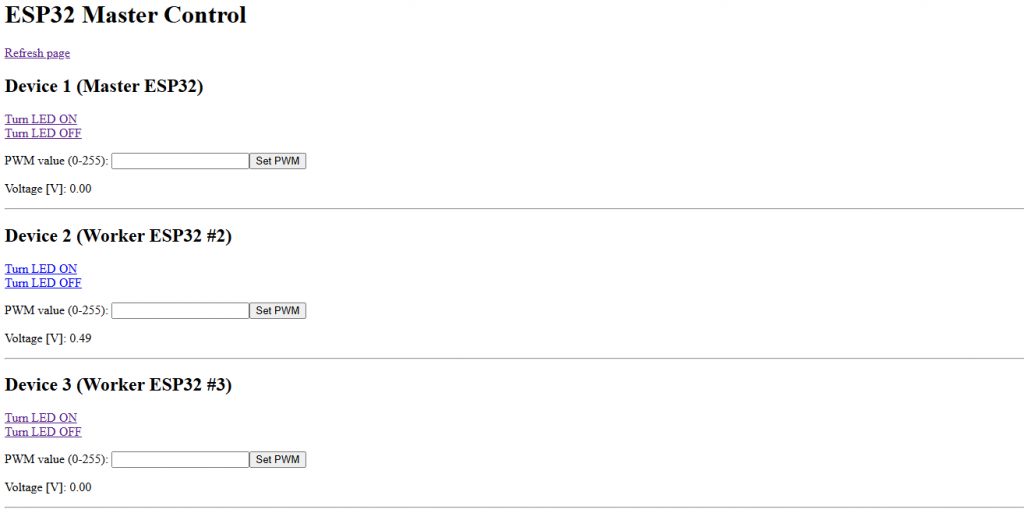
As mentioned before, this is a step backwards in terms of appearance and comfort, but my intention was to illustrate the principle.
Option 2a: Async WebServer and ESP-NOW Serial (“STA-only”)
In this constellation, too, the master/worker 1 is a server in relation to the device that displays the website in the browser. ESP-NOW communication between master/worker 1 and worker 2 or 3 takes place in the router’s network. Workers 2 and 3 must also be assigned IP addresses, but the MAC address is decisive for ESP-NOW communication. I have described how to determine the MAC address here.
Sketch for the Master/Worker 1
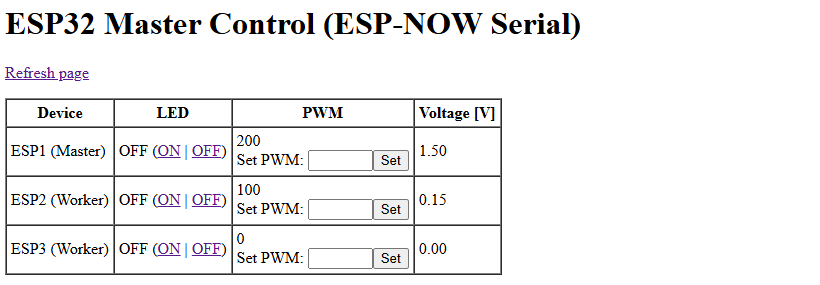
I will not go into the details of ESP-NOW Serial. You can read about that here if you need to. In principle, the sketch is structured in the same way as the previous master sketch. Only the communication between Master/Worker 1 and Worker 2 or 3 is “translated” to ESP-NOW Serial. The data to and from the workers is transmitted as structures.
And so that the output is not too boring, we present everything here in table form.
#include <WiFi.h>
#include <AsyncTCP.h>
#include <ESPAsyncWebServer.h>

#include "ESP32_NOW_Serial.h"
#include "MacAddress.h"


#define ESPNOW_WIFI_CHANNEL 1        // TODO: router channel
#define VOLTAGE_UPDATE_PERIOD 2000   // local voltage update every 2s

// ---------- Pins ----------
const int LED_PIN    = 2;
const int PWM_PIN    = 5;
const int ANALOG_PIN = 34;

IPAddress ip(192,168,178,112);  //TODO
IPAddress gateway(192,168,178,1);  //TODO
IPAddress subnet(255,255,255,0);  //TODO

// ---------- WiFi STA config ----------
constexpr char WIFI_SSID[] = "Your SSID";  //TODO
constexpr char WIFI_PASS[] = "Your password";  //TODO

// ---------- Worker MAC addresses ----------
const MacAddress worker2_mac({0x94, 0x3C, 0xC6, 0x34, 0xCF, 0xA4});  // TODO
const MacAddress worker3_mac({0xC8, 0xC9, 0xA3, 0xCA, 0x22, 0x70});  // TODO

// ---------- ESP-NOW Serial ----------
ESP_NOW_Serial_Class NowSerial2(worker2_mac, ESPNOW_WIFI_CHANNEL, WIFI_IF_STA);
ESP_NOW_Serial_Class NowSerial3(worker3_mac, ESPNOW_WIFI_CHANNEL, WIFI_IF_STA);

// ---------- Packet structures ----------
struct WorkerStatusPacket {
  float   voltage;
  uint8_t pwm;
  uint8_t ledOn;
};

struct WorkerCommandPacket {
  uint8_t pwm;
  uint8_t ledOn;
};

// ---------- Node data for UI ----------
struct NodeData {
  bool   ledOn;
  int    pwm;
  float  voltage;
};

// index: 0=master, 1=worker2, 2=worker3
NodeData nodes[3];

unsigned long lastLocalVoltageMillis = 0;

AsyncWebServer server(80);


// ========== Helpers ==========

void connectWiFi() {
  WiFi.mode(WIFI_STA);
  WiFi.config(ip, gateway, subnet);
  WiFi.begin(WIFI_SSID, WIFI_PASS, ESPNOW_WIFI_CHANNEL);
  Serial.print("Connecting to WiFi");
  while (WiFi.status() != WL_CONNECTED) {
    Serial.print(".");
    delay(400);
  }
  Serial.println();
  Serial.println(WiFi.localIP());
}

float readLocalVoltage() {
  int raw = analogRead(ANALOG_PIN);
  return 3.3f * raw / 4096.0f;
}

void processWorkerSerial(ESP_NOW_Serial_Class &serial, NodeData &data) {
  while (serial.available() >= (int)sizeof(WorkerStatusPacket)) {
    WorkerStatusPacket pkt;
    serial.readBytes((uint8_t*)&pkt, sizeof(pkt));
    data.voltage = pkt.voltage;
    data.pwm     = pkt.pwm;
    data.ledOn   = (pkt.ledOn != 0);
  }
}

void sendCommandToWorker(ESP_NOW_Serial_Class& serial, NodeData& node) {
  WorkerCommandPacket cmd;
  cmd.pwm = node.pwm;
  cmd.ledOn = node.ledOn ? 1 : 0;
  serial.write((uint8_t*)&cmd, sizeof(cmd));
}


// ========== Simple HTML page (NO auto-refresh) ==========

String buildMainPage() {
  String html;
  html += "<!DOCTYPE html><html><head><meta charset='UTF-8'><title>ESP32 Master Control</title></head><body>";

  html += "<h1>ESP32 Master Control (ESP-NOW Serial)</h1>";
  html += "<p><a href='/'>Refresh page</a></p>";

  html += "<table border='1' cellpadding='4' cellspacing='0'>";
  html += "<tr><th>Device</th><th>LED</th><th>PWM</th><th>Voltage [V]</th></tr>";

  // -------- Master (index 0) --------
  html += "<tr><td>ESP1 (Master)</td><td>";
  html += (nodes[0].ledOn ? "ON" : "OFF");
  html += " (";
  html += "<a href='/esp1/led?state=1'>ON</a> | ";
  html += "<a href='/esp1/led?state=0'>OFF</a>)";
  html += "</td><td>";
  html += String(nodes[0].pwm);
  html += "<br><form action='/esp1/pwm' method='get'>Set PWM: ";
  html += "<input type='text' name='value' size='4'><input type='submit' value='Set'></form>";
  html += "</td><td>";
  html += String(nodes[0].voltage, 2);
  html += "</td></tr>";

  // -------- Worker 2 (index 1) --------
  html += "<tr><td>ESP2 (Worker)</td><td>";
  html += (nodes[1].ledOn ? "ON" : "OFF");
  html += " (";
  html += "<a href='/esp2/led?state=1'>ON</a> | ";
  html += "<a href='/esp2/led?state=0'>OFF</a>)";
  html += "</td><td>";
  html += String(nodes[1].pwm);
  html += "<br><form action='/esp2/pwm' method='get'>Set PWM: ";
  html += "<input type='text' name='value' size='4'><input type='submit' value='Set'></form>";
  html += "</td><td>";
  html += String(nodes[1].voltage, 2);
  html += "</td></tr>";

  // -------- Worker 3 (index 2) --------
  html += "<tr><td>ESP3 (Worker)</td><td>";
  html += (nodes[2].ledOn ? "ON" : "OFF");
  html += " (";
  html += "<a href='/esp3/led?state=1'>ON</a> | ";
  html += "<a href='/esp3/led?state=0'>OFF</a>)";
  html += "</td><td>";
  html += String(nodes[2].pwm);
  html += "<br><form action='/esp3/pwm' method='get'>Set PWM: ";
  html += "<input type='text' name='value' size='4'><input type='submit' value='Set'></form>";
  html += "</td><td>";
  html += String(nodes[2].voltage, 2);
  html += "</td></tr>";

  html += "</table></body></html>";
  return html;
}


// ========== Setup ==========

void setupWiFiAndEspNow() {
  connectWiFi();
  NowSerial2.begin(115200);
  NowSerial3.begin(115200);
}

void setup() {
  Serial.begin(115200);

  pinMode(LED_PIN, OUTPUT);
  digitalWrite(LED_PIN, LOW);

  pinMode(ANALOG_PIN, INPUT);

  ledcAttach(PWM_PIN, 5000, 8);
  ledcWrite(PWM_PIN, 0);

  for (int i = 0; i < 3; i++) {
    nodes[i].ledOn   = false;
    nodes[i].pwm     = 0;
    nodes[i].voltage = 0.0f;
  }

  setupWiFiAndEspNow();

  // -------- Web routes --------
  server.on("/", HTTP_GET, [](AsyncWebServerRequest* request) {
    request->send(200, "text/html", buildMainPage());
  });

  // Master LED
  server.on("/esp1/led", HTTP_GET, [](AsyncWebServerRequest* request) {
    int s = request->getParam("state")->value().toInt();
    nodes[0].ledOn = (s != 0);
    digitalWrite(LED_PIN, nodes[0].ledOn ? HIGH : LOW);
    request->redirect("/");
  });

  // Master PWM
  server.on("/esp1/pwm", HTTP_GET, [](AsyncWebServerRequest* request) {
    int val = request->getParam("value")->value().toInt();
    if (val < 0) val = 0;
    if (val > 255) val = 255;
    nodes[0].pwm = val;
    ledcWrite(PWM_PIN, nodes[0].pwm);
    request->redirect("/");
  });

  // Worker 2 LED
  server.on("/esp2/led", HTTP_GET, [](AsyncWebServerRequest* request) {
    int s = request->getParam("state")->value().toInt();
    nodes[1].ledOn = (s != 0);
    sendCommandToWorker(NowSerial2, nodes[1]);
    request->redirect("/");
  });

  // Worker 2 PWM
  server.on("/esp2/pwm", HTTP_GET, [](AsyncWebServerRequest* request) {
    int val = request->getParam("value")->value().toInt();
    if (val < 0) val = 0;
    if (val > 255) val = 255;
    nodes[1].pwm = val;
    sendCommandToWorker(NowSerial2, nodes[1]);
    request->redirect("/");
  });

  // Worker 3 LED
  server.on("/esp3/led", HTTP_GET, [](AsyncWebServerRequest* request) {
    int s = request->getParam("state")->value().toInt();
    nodes[2].ledOn = (s != 0);
    sendCommandToWorker(NowSerial3, nodes[2]);
    request->redirect("/");
  });

  // Worker 3 PWM
  server.on("/esp3/pwm", HTTP_GET, [](AsyncWebServerRequest* request) {
    int val = request->getParam("value")->value().toInt();
    if (val < 0) val = 0;
    if (val > 255) val = 255;
    nodes[2].pwm = val;
    sendCommandToWorker(NowSerial3, nodes[2]);
    request->redirect("/");
  });

  server.begin();
  Serial.println("Master ready.");
}


// ========== Loop ==========

void loop() {
  unsigned long now = millis();

  // Update master's own voltage
  if (now - lastLocalVoltageMillis > VOLTAGE_UPDATE_PERIOD) {
    lastLocalVoltageMillis = now;
    nodes[0].voltage = readLocalVoltage();
  }

  // Process worker packets
  processWorkerSerial(NowSerial2, nodes[1]);
  processWorkerSerial(NowSerial3, nodes[2]);

  delay(1);
}
#include <WiFi.h>
#include "ESP32_NOW_Serial.h"
#include "MacAddress.h"

#define ESPNOW_WIFI_CHANNEL 1        // same as master / router
#define STATUS_SEND_PERIOD 2000      // [ms]

// same pins as on master
const int LED_PIN    = 2;
const int PWM_PIN    = 5;
const int ANALOG_PIN = 34;

IPAddress ip(192,168,178,113);  //TODO
IPAddress gateway(192,168,178,1);  //TODO
IPAddress subnet(255,255,255,0);  //TODO

// ---------- WiFi STA config ----------
constexpr char WIFI_SSID[] = "Your SSID";  //TODO
constexpr char WIFI_PASS[] = "Your password";  //TODO

// ---------- MAC of master (STA interface) ----------
const MacAddress master_mac({0xC8, 0xC9, 0xA3, 0xC6, 0xFE, 0x54});  // TODO

ESP_NOW_Serial_Class NowSerial(master_mac, ESPNOW_WIFI_CHANNEL, WIFI_IF_STA);

// data packets
struct WorkerStatusPacket {
  float   voltage;
  uint8_t pwm;
  uint8_t ledOn;
};

struct WorkerCommandPacket {
  uint8_t pwm;
  uint8_t ledOn;
};

// local state
uint8_t currentPwm   = 0;
bool    currentLedOn = false;

unsigned long lastStatusSent = 0;

// ---------- helpers ----------
void connectWiFi() {
  WiFi.mode(WIFI_STA);
  WiFi.config(ip, gateway, subnet);
  WiFi.begin(WIFI_SSID, WIFI_PASS, ESPNOW_WIFI_CHANNEL);
  Serial.print("Connecting to WiFi");
  while (WiFi.status() != WL_CONNECTED) {
    delay(500);
    Serial.print(".");
  }
  Serial.println();
  Serial.print("Connected. IP address: ");
  Serial.println(WiFi.localIP());
}

float readVoltage() {
  int raw = analogRead(ANALOG_PIN);
  float voltage = 3.3f * raw / 4096.0f;
  return voltage;
}

void applyCommand(const WorkerCommandPacket& cmd) {
  currentPwm   = cmd.pwm;
  currentLedOn = (cmd.ledOn != 0);

  ledcWrite(PWM_PIN, currentPwm);
  digitalWrite(LED_PIN, currentLedOn ? HIGH : LOW);
}

void sendStatus() {
  WorkerStatusPacket pkt;
  pkt.voltage = readVoltage();
  pkt.pwm     = currentPwm;
  pkt.ledOn   = currentLedOn ? 1 : 0;

  int ok = NowSerial.write((uint8_t*)&pkt, sizeof(pkt));
  if (!ok) {
    Serial.println("Status send failed");
  }
}

// ---------- setup() ----------
void setup() {
  Serial.begin(115200);

  pinMode(LED_PIN, OUTPUT);
  digitalWrite(LED_PIN, LOW);

  pinMode(ANALOG_PIN, INPUT);

  ledcAttach(PWM_PIN, 5000, 8);
  ledcWrite(PWM_PIN, 0);

  connectWiFi();

  // ESP-NOW Serial on STA interface
  NowSerial.begin(115200);

  Serial.println("Worker ready.");
}

// ---------- loop() ----------
void loop() {
  unsigned long now = millis();

  // periodic status to master
  if (now - lastStatusSent > STATUS_SEND_PERIOD) {
    lastStatusSent = now;
    sendStatus();
  }

  // incoming commands
  while (NowSerial.available() >= (int)sizeof(WorkerCommandPacket)) {
    WorkerCommandPacket cmd;
    NowSerial.readBytes((uint8_t*)&cmd, sizeof(cmd));
    applyCommand(cmd);
  }

  delay(1);
}
And this is the output:
Option 2b: Async WebServer and ESP-NOW Serial (STA/AP)
In this constellation, we have to set up an Async WebServer on the master ESP32 as usual. In addition, the master ESP32 provides a network to which Worker 2 and Worker 3 can connect. You assign a name and password of your choice for this network.
An important point is that the SoftAP MAC address of the master ESP32 is used for ESP-NOW serial communication. I have described how to determine it here. Normally you only have to add 1 to the last number of the MAC address.
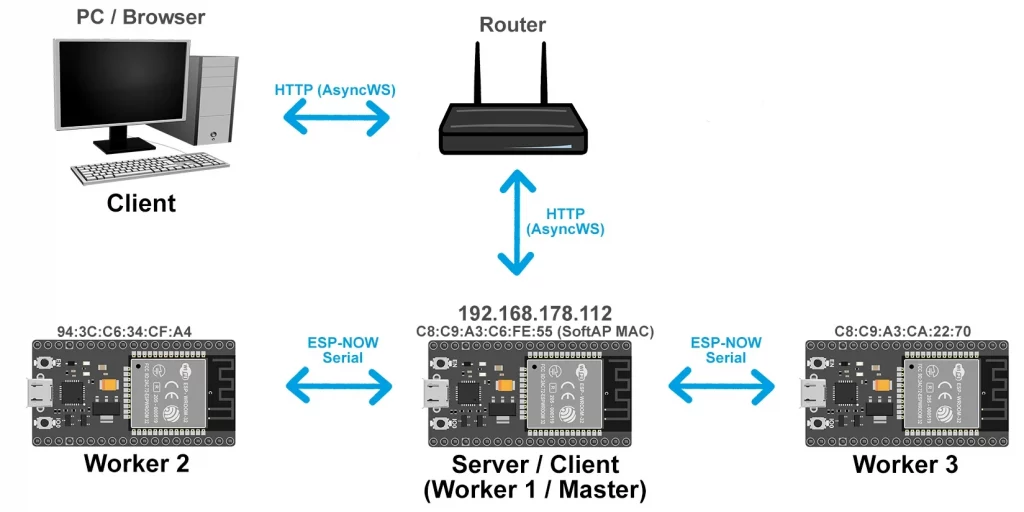
The network is set up in the startAPForWorkers() function. This should be fairly self-explanatory. What you may notice is that in this version we specify the ESPNOW_WIFI_CHANNEL for all participants. This is necessary because we have two networks and the Wi-Fi channels of the two could differ when automatically selected.
Not much changes on the worker side, except that the SSID and password of the network of the master ESP32 are used.
#include <WiFi.h>
#include <AsyncTCP.h>
#include <ESPAsyncWebServer.h>

#include "ESP32_NOW_Serial.h"
#include "MacAddress.h"
#include "esp_wifi.h"

#define ESPNOW_WIFI_CHANNEL 1        // All ESP32 and the master's AP use this channel
#define VOLTAGE_UPDATE_PERIOD 2000   // [ms] local voltage update period

// ---------- Pins ----------
const int LED_PIN    = 2;
const int PWM_PIN    = 5;
const int ANALOG_PIN = 34;

// ---------- WiFi STA (home network) ----------
IPAddress ip(192,168,178,112);     //TODO
IPAddress gateway(192,168,178,1);  //TODO
IPAddress subnet(255,255,255,0);   //TODO

constexpr char WIFI_SSID[] = "Your SSID";  //TODO
constexpr char WIFI_PASS[] = "Your password";  //TODO

// ---------- WiFi AP (for the workers) ----------
const char* AP_SSID = "ESP32-Master";        // TODO: choose AP SSID for workers
const char* AP_PASS = "12345678";            // TODO: choose AP password (>= 8 chars)

// ---------- Worker MAC addresses (STA interface of ESP2 and ESP3) ----------
const MacAddress worker2_mac({0x94, 0x3C, 0xC6, 0x34, 0xCF, 0xA4});  // TODO
const MacAddress worker3_mac({0xC8, 0xC9, 0xA3, 0xCA, 0x22, 0x70});  // TODO

// ---------- ESP-NOW Serial on MASTER: use AP interface ----------
ESP_NOW_Serial_Class NowSerial2(worker2_mac, ESPNOW_WIFI_CHANNEL, WIFI_IF_AP);
ESP_NOW_Serial_Class NowSerial3(worker3_mac, ESPNOW_WIFI_CHANNEL, WIFI_IF_AP);

// ---------- Packet structures ----------
struct WorkerStatusPacket {
  float   voltage;
  uint8_t pwm;
  uint8_t ledOn;
};

struct WorkerCommandPacket {
  uint8_t pwm;
  uint8_t ledOn;
};

// ---------- Node data for UI ----------
struct NodeData {
  bool   ledOn;
  int    pwm;
  float  voltage;
};

// index: 0 = master, 1 = worker2, 2 = worker3
NodeData nodes[3];

unsigned long lastLocalVoltageMillis = 0;

AsyncWebServer server(80);


// ================== Helper functions ==================

void connectWiFiSTA() {
  // Master connects as STA to your home router
  WiFi.mode(WIFI_AP_STA);
  WiFi.config(ip, gateway, subnet);
  WiFi.begin(WIFI_SSID, WIFI_PASS, ESPNOW_WIFI_CHANNEL);
  Serial.print("Connecting to home WiFi (STA)");
  while (WiFi.status() != WL_CONNECTED) {
    Serial.print(".");
    delay(400);
  }
  Serial.println();
  Serial.print("STA IP address (use this in browser): ");
  Serial.println(WiFi.localIP());
}

void startAPForWorkers() {
  // Master starts an AP for the worker ESP32 boards
  bool ok = WiFi.softAP(AP_SSID, AP_PASS, ESPNOW_WIFI_CHANNEL);
  if (!ok) {
    Serial.println("Error starting AP. Restarting...");
    delay(2000);
    ESP.restart();
  }
  Serial.print("AP started. SSID: ");
  Serial.println(AP_SSID);
  Serial.print("AP IP: ");
  Serial.println(WiFi.softAPIP());
}

float readLocalVoltage() {
  int raw = analogRead(ANALOG_PIN);
  return 3.3f * raw / 4096.0f;
}

void processWorkerSerial(ESP_NOW_Serial_Class &serial, NodeData &data) {
  while (serial.available() >= (int)sizeof(WorkerStatusPacket)) {
    WorkerStatusPacket pkt;
    serial.readBytes((uint8_t*)&pkt, sizeof(pkt));
    data.voltage = pkt.voltage;
    data.pwm     = pkt.pwm;
    data.ledOn   = (pkt.ledOn != 0);
  }
}

void sendCommandToWorker(ESP_NOW_Serial_Class& serial, NodeData& node) {
  WorkerCommandPacket cmd;
  cmd.pwm   = (uint8_t)node.pwm;
  cmd.ledOn = node.ledOn ? 1 : 0;
  serial.write((uint8_t*)&cmd, sizeof(cmd));
}


// ================== HTML page (no auto-refresh, no last-update) ==================

String buildMainPage() {
  String html;
  html += "<!DOCTYPE html><html><head><meta charset='UTF-8'>";
  html += "<title>ESP32 Master Control</title></head><body>";

  html += "<h1>ESP32 Master Control (ESP-NOW Serial, AP+STA)</h1>";
  html += "<p>STA IP address: ";
  html += WiFi.localIP().toString();
  html += "</p>";
  html += "<p><a href='/'>Refresh page</a></p>";

  html += "<table border='1' cellpadding='4' cellspacing='0'>";
  html += "<tr><th>Device</th><th>LED</th><th>PWM</th><th>Voltage [V]</th></tr>";

  // ----- ESP1 (Master / Worker #1) -----
  html += "<tr><td>ESP1 (Master)</td><td>";
  html += (nodes[0].ledOn ? "ON" : "OFF");
  html += " (";
  html += "<a href='/esp1/led?state=1'>ON</a> | ";
  html += "<a href='/esp1/led?state=0'>OFF</a>)";
  html += "</td><td>";
  html += String(nodes[0].pwm);
  html += "<br><form action='/esp1/pwm' method='get'>Set PWM: ";
  html += "<input type='text' name='value' size='4'>";
  html += "<input type='submit' value='Set'>";
  html += "</form>";
  html += "</td><td>";
  html += String(nodes[0].voltage, 2);
  html += "</td></tr>";

  // ----- ESP2 (Worker) -----
  html += "<tr><td>ESP2 (Worker)</td><td>";
  html += (nodes[1].ledOn ? "ON" : "OFF");
  html += " (";
  html += "<a href='/esp2/led?state=1'>ON</a> | ";
  html += "<a href='/esp2/led?state=0'>OFF</a>)";
  html += "</td><td>";
  html += String(nodes[1].pwm);
  html += "<br><form action='/esp2/pwm' method='get'>Set PWM: ";
  html += "<input type='text' name='value' size='4'>";
  html += "<input type='submit' value='Set'>";
  html += "</form>";
  html += "</td><td>";
  html += String(nodes[1].voltage, 2);
  html += "</td></tr>";

  // ----- ESP3 (Worker) -----
  html += "<tr><td>ESP3 (Worker)</td><td>";
  html += (nodes[2].ledOn ? "ON" : "OFF");
  html += " (";
  html += "<a href='/esp3/led?state=1'>ON</a> | ";
  html += "<a href='/esp3/led?state=0'>OFF</a>)";
  html += "</td><td>";
  html += String(nodes[2].pwm);
  html += "<br><form action='/esp3/pwm' method='get'>Set PWM: ";
  html += "<input type='text' name='value' size='4'>";
  html += "<input type='submit' value='Set'>";
  html += "</form>";
  html += "</td><td>";
  html += String(nodes[2].voltage, 2);
  html += "</td></tr>";

  html += "</table></body></html>";
  return html;
}


// ================== Setup ==================

void setup() {
  Serial.begin(115200);

  pinMode(LED_PIN, OUTPUT);
  digitalWrite(LED_PIN, LOW);
  pinMode(ANALOG_PIN, INPUT);

  ledcAttach(PWM_PIN, 5000, 8);
  ledcWrite(PWM_PIN, 0);

  // init node data
  for (int i = 0; i < 3; i++) {
    nodes[i].ledOn   = false;
    nodes[i].pwm     = 0;
    nodes[i].voltage = 0.0f;
  }

  // combined STA (home WiFi) + AP (for workers)
  connectWiFiSTA();
  startAPForWorkers();

  // ESP-NOW Serial uses AP interface on the master
  NowSerial2.begin(115200);
  NowSerial3.begin(115200);

  // ---------- Web routes ----------

  // main page
  server.on("/", HTTP_GET, [](AsyncWebServerRequest* request) {
    request->send(200, "text/html", buildMainPage());
  });

  // ---- Master LED ----
  server.on("/esp1/led", HTTP_GET, [](AsyncWebServerRequest* request) {
    if (!request->hasParam("state")) {
      request->send(400, "text/plain", "Missing state parameter");
      return;
    }
    int s = request->getParam("state")->value().toInt();
    nodes[0].ledOn = (s != 0);
    digitalWrite(LED_PIN, nodes[0].ledOn ? HIGH : LOW);
    request->redirect("/");
  });

  // ---- Master PWM ----
  server.on("/esp1/pwm", HTTP_GET, [](AsyncWebServerRequest* request) {
    if (!request->hasParam("value")) {
      request->send(400, "text/plain", "Missing value parameter");
      return;
    }
    int val = request->getParam("value")->value().toInt();
    if (val < 0)   val = 0;
    if (val > 255) val = 255;
    nodes[0].pwm = val;
    ledcWrite(PWM_PIN, nodes[0].pwm);
    request->redirect("/");
  });

  // ---- Worker 2 LED ----
  server.on("/esp2/led", HTTP_GET, [](AsyncWebServerRequest* request) {
    if (!request->hasParam("state")) {
      request->send(400, "text/plain", "Missing state parameter");
      return;
    }
    int s = request->getParam("state")->value().toInt();
    nodes[1].ledOn = (s != 0);
    sendCommandToWorker(NowSerial2, nodes[1]);
    request->redirect("/");
  });

  // ---- Worker 2 PWM ----
  server.on("/esp2/pwm", HTTP_GET, [](AsyncWebServerRequest* request) {
    if (!request->hasParam("value")) {
      request->send(400, "text/plain", "Missing value parameter");
      return;
    }
    int val = request->getParam("value")->value().toInt();
    if (val < 0)   val = 0;
    if (val > 255) val = 255;
    nodes[1].pwm = val;
    sendCommandToWorker(NowSerial2, nodes[1]);
    request->redirect("/");
  });

  // ---- Worker 3 LED ----
  server.on("/esp3/led", HTTP_GET, [](AsyncWebServerRequest* request) {
    if (!request->hasParam("state")) {
      request->send(400, "text/plain", "Missing state parameter");
      return;
    }
    int s = request->getParam("state")->value().toInt();
    nodes[2].ledOn = (s != 0);
    sendCommandToWorker(NowSerial3, nodes[2]);
    request->redirect("/");
  });

  // ---- Worker 3 PWM ----
  server.on("/esp3/pwm", HTTP_GET, [](AsyncWebServerRequest* request) {
    if (!request->hasParam("value")) {
      request->send(400, "text/plain", "Missing value parameter");
      return;
    }
    int val = request->getParam("value")->value().toInt();
    if (val < 0)   val = 0;
    if (val > 255) val = 255;
    nodes[2].pwm = val;
    sendCommandToWorker(NowSerial3, nodes[2]);
    request->redirect("/");
  });

  server.begin();
  Serial.println("Master (AP+STA) ready.");

  Serial.print("Soft AP MAC address: ");
  Serial.println(WiFi.softAPmacAddress());   // Master-AP-MAC für master_ap_mac
}


// ================== Loop ==================

void loop() {
  unsigned long now = millis();

  // Update master's own voltage every 2 s
  if (now - lastLocalVoltageMillis > VOLTAGE_UPDATE_PERIOD) {
    lastLocalVoltageMillis = now;
    nodes[0].voltage = readLocalVoltage();
  }

  // Process worker packets
  processWorkerSerial(NowSerial2, nodes[1]);
  processWorkerSerial(NowSerial3, nodes[2]);

  delay(1);
}
#include <WiFi.h>
#include "ESP32_NOW_Serial.h"
#include "MacAddress.h"
#include "esp_wifi.h"

#define ESPNOW_WIFI_CHANNEL 1
#define STATUS_SEND_PERIOD 2000  // [ms]

// Same pins as on master
const int LED_PIN    = 2;
const int PWM_PIN    = 5;
const int ANALOG_PIN = 34;

// -------- WiFi STA: connect to master's AP --------
const char* AP_SSID = "ESP32-Master";   // must match master's AP_SSID
const char* AP_PASS = "12345678";       // must match master's AP_PASS

const MacAddress master_ap_mac({0xC8, 0xC9, 0xA3, 0xC6, 0xFE, 0x55});  // TODO: adjust

// ESP-NOW Serial on worker: use STA interface
ESP_NOW_Serial_Class NowSerial(master_ap_mac, ESPNOW_WIFI_CHANNEL, WIFI_IF_STA);

// ---------- Data packets ----------
struct WorkerStatusPacket {
  float   voltage;
  uint8_t pwm;
  uint8_t ledOn;
};

struct WorkerCommandPacket {
  uint8_t pwm;
  uint8_t ledOn;
};

uint8_t currentPwm   = 0;
bool    currentLedOn = false;

unsigned long lastStatusSent = 0;


// ================== Helper functions ==================

void connectToMasterAP() {
  WiFi.mode(WIFI_STA);
  WiFi.begin(AP_SSID, AP_PASS, ESPNOW_WIFI_CHANNEL);
  Serial.print("Connecting to master AP");
  while (WiFi.status() != WL_CONNECTED) {
    Serial.print(".");
    delay(400);
  }
  Serial.println();
  Serial.print("Worker STA IP (not really needed for ESP-NOW): ");
  Serial.println(WiFi.localIP());
}

float readVoltage() {
  int raw = analogRead(ANALOG_PIN);
  return 3.3f * raw / 4096.0f;
}

void applyCommand(const WorkerCommandPacket& cmd) {
  currentPwm   = cmd.pwm;
  currentLedOn = (cmd.ledOn != 0);

  ledcWrite(PWM_PIN, currentPwm);
  digitalWrite(LED_PIN, currentLedOn ? HIGH : LOW);
}

void sendStatus() {
  WorkerStatusPacket pkt;
  pkt.voltage = readVoltage();
  pkt.pwm     = currentPwm;
  pkt.ledOn   = currentLedOn ? 1 : 0;

  int ok = NowSerial.write((uint8_t*)&pkt, sizeof(pkt));
  if (!ok) {
    Serial.println("Status send failed");
  }
}


// ================== Setup ==================

void setup() {
  Serial.begin(115200);

  pinMode(LED_PIN, OUTPUT);
  digitalWrite(LED_PIN, LOW);

  pinMode(ANALOG_PIN, INPUT);

  ledcAttach(PWM_PIN, 5000, 8);
  ledcWrite(PWM_PIN, 0);

  connectToMasterAP();

  NowSerial.begin(115200);

  Serial.println("Worker ready (STA → master AP).");
}


// ================== Loop ==================

void loop() {
  unsigned long now = millis();

  // periodically send status to master
  if (now - lastStatusSent > STATUS_SEND_PERIOD) {
    lastStatusSent = now;
    sendStatus();
  }

  // handle incoming commands
  while (NowSerial.available() >= (int)sizeof(WorkerCommandPacket)) {
    WorkerCommandPacket cmd;
    NowSerial.readBytes((uint8_t*)&cmd, sizeof(cmd));
    applyCommand(cmd);
  }

  delay(1);
}
Complete version ESP-NOW Serial (“STA-only”)
I would like to provide a complete version, i.e. with sliders and switches for the “STA-only” version with ESP-NOW Serial.
#include <WiFi.h>
#include <AsyncTCP.h>
#include <ESPAsyncWebServer.h>

#include "ESP32_NOW_Serial.h"
#include "MacAddress.h"

// ================== CONFIG ==================

#define ESPNOW_WIFI_CHANNEL     1
#define VOLTAGE_UPDATE_PERIOD  2000

// ---------- Pins ----------
const int LED_PIN    = 2;
const int PWM_PIN    = 5;
const int ANALOG_PIN = 34;

// ---------- Network ----------
IPAddress ip(192,168,178,112);  //TODO
IPAddress gateway(192,168,178,1);  //TODO
IPAddress subnet(255,255,255,0);  //TODO

constexpr char WIFI_SSID[] = "Your SSID";  //TODO
constexpr char WIFI_PASS[] = "Your password";  //TODO

// ---------- Worker MACs ----------
const MacAddress worker2_mac({0x94,0x3C,0xC6,0x34,0xCF,0xA4});  //TODO
const MacAddress worker3_mac({0xC8,0xC9,0xA3,0xCA,0x22,0x70});  //TODO

// ---------- ESP-NOW Serial ----------
ESP_NOW_Serial_Class NowSerial2(worker2_mac, ESPNOW_WIFI_CHANNEL, WIFI_IF_STA);
ESP_NOW_Serial_Class NowSerial3(worker3_mac, ESPNOW_WIFI_CHANNEL, WIFI_IF_STA);

// ================== DATA ==================

struct WorkerStatusPacket {
  float   voltage;
  uint8_t pwm;
  uint8_t ledOn;
};

struct WorkerCommandPacket {
  uint8_t pwm;
  uint8_t ledOn;
};

struct NodeData {
  bool  ledOn;
  int   pwm;
  float voltage;
};

// index: 0 = master, 1 = worker2, 2 = worker3
NodeData nodes[3];

unsigned long lastLocalVoltageMillis = 0;

AsyncWebServer server(80);

// ================== HELPERS ==================

void connectWiFi() {
  WiFi.mode(WIFI_STA);
  WiFi.config(ip, gateway, subnet);
  WiFi.begin(WIFI_SSID, WIFI_PASS, ESPNOW_WIFI_CHANNEL);
  Serial.print("Connecting to WiFi");
  while (WiFi.status() != WL_CONNECTED) {
    delay(400);
    Serial.print(".");
  }
  Serial.println();
  Serial.print("IP: ");
  Serial.println(WiFi.localIP());
}

float readLocalVoltage() {
  int raw = analogRead(ANALOG_PIN);
  return 3.3f * raw / 4096.0f;
}

void processWorkerSerial(ESP_NOW_Serial_Class &serial, NodeData &data) {
  while (serial.available() >= (int)sizeof(WorkerStatusPacket)) {
    WorkerStatusPacket pkt;
    serial.readBytes((uint8_t*)&pkt, sizeof(pkt));
    data.voltage = pkt.voltage;
    data.pwm     = pkt.pwm;
    data.ledOn   = pkt.ledOn != 0;
  }
}

void sendCommandToWorker(ESP_NOW_Serial_Class &serial, NodeData &node) {
  WorkerCommandPacket cmd;
  cmd.pwm   = node.pwm;
  cmd.ledOn = node.ledOn ? 1 : 0;
  serial.write((uint8_t*)&cmd, sizeof(cmd));
}

// ================== HTML UI ==================

String buildMainPage() {
  String html;
  html += F(R"rawliteral(
<!DOCTYPE html>
<html>
<head>
<meta charset="UTF-8">
<meta name="viewport" content="width=device-width,initial-scale=1">
<title>ESP32 ESP-NOW Control</title>
<style>
body{font-family:Arial,Helvetica,sans-serif;background:#f0f2f5;margin:0}
.container{max-width:900px;margin:30px auto;background:#fff;
padding:20px;border-radius:14px;box-shadow:0 6px 18px rgba(0,0,0,.1)}
h1{text-align:center;margin-bottom:10px}
table{width:100%;border-collapse:collapse}
th,td{padding:10px;text-align:center;border-bottom:1px solid #ddd}

.switch{position:relative;display:inline-block;width:50px;height:26px}
.switch input{display:none}
.slider{position:absolute;cursor:pointer;inset:0;background:#ccc;border-radius:34px}
.slider:before{content:"";position:absolute;height:20px;width:20px;left:3px;bottom:3px;
background:white;border-radius:50%;transition:.2s}
input:checked+.slider{background:#4CAF50}
input:checked+.slider:before{transform:translateX(24px)}

.pwm-box{display:inline-flex;align-items:center;gap:8px;width:260px}
input[type=range]{width:180px}

.value{
  font-variant-numeric: tabular-nums;
  display:inline-block;
  width:3ch;
  text-align:right;
}
</style>
</head>
<body>
<div class="container">
<h1>ESP32 ESP-NOW Control</h1>

<table>
<tr><th>Device</th><th>LED</th><th>PWM</th><th>Voltage [V]</th></tr>

<script>
async function refreshState(){
  const r = await fetch('/api/state',{cache:'no-store'});
  const s = await r.json();
  [1,2,3].forEach(d=>{
    const n=s['dev'+d];
    document.getElementById('led'+d).checked=n.ledOn;
    document.getElementById('pwm'+d).value=n.pwm;
    document.getElementById('pwmt'+d).textContent=n.pwm;
    document.getElementById('v'+d).textContent=n.voltage.toFixed(2);
  });
}
async function setLed(dev,val){
  await fetch(`/api/set?dev=${dev}&led=${val}`);
}
async function setPwm(dev,val){
  await fetch(`/api/set?dev=${dev}&pwm=${val}`);
}
setInterval(refreshState,5000);
window.onload=refreshState;
</script>
)rawliteral");

  const char* names[]={"ESP1 (Master)","ESP2 (Worker)","ESP3 (Worker)"};

  for(int i=1;i<=3;i++){
    html += "<tr><td>"+String(names[i-1])+"</td>";

    html += "<td><label class='switch'><input type='checkbox' id='led"+String(i)+"' ";
    html += "onchange='setLed("+String(i)+",this.checked?1:0)'>";
    html += "<span class='slider'></span></label></td>";

    html += "<td><div class='pwm-box'>";
    html += "<input type='range' min='0' max='255' id='pwm"+String(i)+"' ";
    html += "oninput='pwmt"+String(i)+".textContent=this.value' ";
    html += "onchange='setPwm("+String(i)+",this.value)'>";
    html += "<span class='value' id='pwmt"+String(i)+"'>0</span>";
    html += "</div></td>";

    html += "<td><span class='value' id='v"+String(i)+"'>0.00</span></td></tr>";
  }

  html += "</table></div></body></html>";
  return html;
}

// ================== JSON API ==================

String jsonState() {
  String j="{";
  for(int i=0;i<3;i++){
    j+="\"dev"+String(i+1)+"\":{";
    j+="\"ledOn\":"+String(nodes[i].ledOn?1:0)+",";
    j+="\"pwm\":"+String(nodes[i].pwm)+",";
    j+="\"voltage\":"+String(nodes[i].voltage,3)+"}";
    if(i<2) j+=",";
  }
  j+="}";
  return j;
}

// ================== SETUP ==================

void setup() {
  Serial.begin(115200);

  pinMode(LED_PIN, OUTPUT);
  pinMode(ANALOG_PIN, INPUT);

  ledcAttach(PWM_PIN, 5000, 8);
  ledcWrite(PWM_PIN, 0);

  for(int i=0;i<3;i++){
    nodes[i]={false,0,0.0f};
  }

  connectWiFi();
  NowSerial2.begin(115200);
  NowSerial3.begin(115200);

  server.on("/", HTTP_GET, [](AsyncWebServerRequest* r){
    r->send(200,"text/html",buildMainPage());
  });

  server.on("/api/state", HTTP_GET, [](AsyncWebServerRequest* r){
    r->send(200,"application/json",jsonState());
  });

  server.on("/api/set", HTTP_GET, [](AsyncWebServerRequest* r){
    int dev=r->getParam("dev")->value().toInt();
    bool hasLed=r->hasParam("led");
    bool hasPwm=r->hasParam("pwm");

    if(dev==1){
      if(hasLed){ nodes[0].ledOn=r->getParam("led")->value().toInt(); digitalWrite(LED_PIN,nodes[0].ledOn); }
      if(hasPwm){ nodes[0].pwm=r->getParam("pwm")->value().toInt(); ledcWrite(PWM_PIN,nodes[0].pwm); }
    }
    if(dev==2){
      if(hasLed) nodes[1].ledOn=r->getParam("led")->value().toInt();
      if(hasPwm) nodes[1].pwm=r->getParam("pwm")->value().toInt();
      sendCommandToWorker(NowSerial2,nodes[1]);
    }
    if(dev==3){
      if(hasLed) nodes[2].ledOn=r->getParam("led")->value().toInt();
      if(hasPwm) nodes[2].pwm=r->getParam("pwm")->value().toInt();
      sendCommandToWorker(NowSerial3,nodes[2]);
    }
    r->send(200,"text/plain","OK");
  });

  server.begin();
  Serial.println("Master ready.");
}

// ================== LOOP ==================

void loop() {
  unsigned long now=millis();

  if(now-lastLocalVoltageMillis>VOLTAGE_UPDATE_PERIOD){
    lastLocalVoltageMillis=now;
    nodes[0].voltage=readLocalVoltage();
  }

  processWorkerSerial(NowSerial2,nodes[1]);
  processWorkerSerial(NowSerial3,nodes[2]);

  delay(1);
}
#include <WiFi.h>
#include "ESP32_NOW_Serial.h"
#include "MacAddress.h"

#define ESPNOW_WIFI_CHANNEL 1        // same as master / router
#define STATUS_SEND_PERIOD 2000      // [ms]

// same pins as on master
const int LED_PIN    = 2;
const int PWM_PIN    = 5;
const int ANALOG_PIN = 34;

IPAddress ip(192,168,178,113);  //TODO
IPAddress gateway(192,168,178,1);  //TODO
IPAddress subnet(255,255,255,0);  //TODO

// ---------- WiFi STA config ----------
constexpr char WIFI_SSID[] = "Your SSID";  //TODO
constexpr char WIFI_PASS[] = "Your password";  //TODO
// ---------- MAC of master (STA interface) ----------

const MacAddress master_mac({0xC8, 0xC9, 0xA3, 0xC6, 0xFE, 0x54});  // TODO

ESP_NOW_Serial_Class NowSerial(master_mac, ESPNOW_WIFI_CHANNEL, WIFI_IF_STA);

// data packets
struct WorkerStatusPacket {
  float   voltage;
  uint8_t pwm;
  uint8_t ledOn;
};

struct WorkerCommandPacket {
  uint8_t pwm;
  uint8_t ledOn;
};

// local state
uint8_t currentPwm   = 0;
bool    currentLedOn = false;

unsigned long lastStatusSent = 0;

// ---------- helpers ----------
void connectWiFi() {
  WiFi.mode(WIFI_STA);
  WiFi.config(ip, gateway, subnet);
  WiFi.begin(WIFI_SSID, WIFI_PASS, ESPNOW_WIFI_CHANNEL);
  Serial.print("Connecting to WiFi");
  while (WiFi.status() != WL_CONNECTED) {
    delay(500);
    Serial.print(".");
  }
  Serial.println();
  Serial.print("Connected. IP address: ");
  Serial.println(WiFi.localIP());
}

float readVoltage() {
  int raw = analogRead(ANALOG_PIN);
  float voltage = 3.3f * raw / 4096.0f;
  return voltage;
}

void applyCommand(const WorkerCommandPacket& cmd) {
  currentPwm   = cmd.pwm;
  currentLedOn = (cmd.ledOn != 0);

  ledcWrite(PWM_PIN, currentPwm);
  digitalWrite(LED_PIN, currentLedOn ? HIGH : LOW);
}

void sendStatus() {
  WorkerStatusPacket pkt;
  pkt.voltage = readVoltage();
  pkt.pwm     = currentPwm;
  pkt.ledOn   = currentLedOn ? 1 : 0;

  int ok = NowSerial.write((uint8_t*)&pkt, sizeof(pkt));
  if (!ok) {
    Serial.println("Status send failed");
  }
}

// ---------- setup() ----------
void setup() {
  Serial.begin(115200);

  pinMode(LED_PIN, OUTPUT);
  digitalWrite(LED_PIN, LOW);

  pinMode(ANALOG_PIN, INPUT);

  ledcAttach(PWM_PIN, 5000, 8);
  ledcWrite(PWM_PIN, 0);

  connectWiFi();

  // ESP-NOW Serial on STA interface
  NowSerial.begin(115200);

  Serial.println("Worker ready.");
}

// ---------- loop() ----------
void loop() {
  unsigned long now = millis();

  // periodic status to master
  if (now - lastStatusSent > STATUS_SEND_PERIOD) {
    lastStatusSent = now;
    sendStatus();
  }

  // incoming commands
  while (NowSerial.available() >= (int)sizeof(WorkerCommandPacket)) {
    WorkerCommandPacket cmd;
    NowSerial.readBytes((uint8_t*)&cmd, sizeof(cmd));
    applyCommand(cmd);
  }

  delay(1);
}
And here is the final result in the browser:
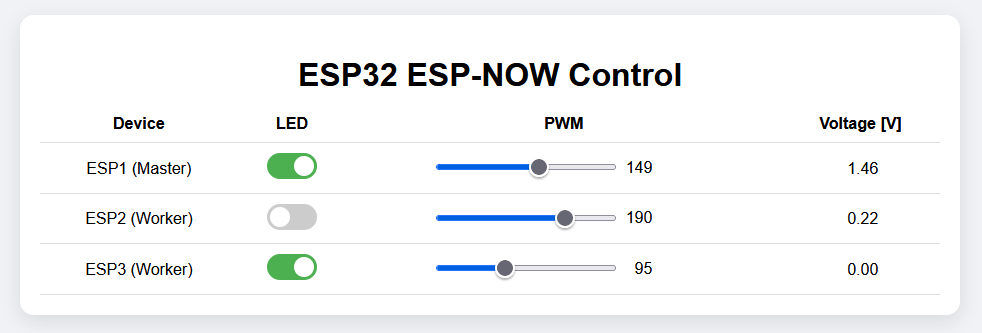
Hi,
Just found you by googling and impressed to leave a comment. Really very informative and sequentially detailed article to learn the concept clearly. Thanks for sharing and looking forward to see more.
Thank you so much for your kind feedback!